Amazon Launches New 1-Hour and 3-Hour Delivery Choices for Quicker Service

Amazon has revealed that delivery speeds are increasing, with new 1-hour and 3-hour delivery choices being introduced in thousands of cities throughout the US. Here are the specifics.

### Amazon Introduces Quicker Delivery Options for Consumers, but with Extra Charges

Amazon achieved its status as the leading retailer by offering rapid, convenient shipping to consumers. Today, the company has unveiled even quicker delivery options.

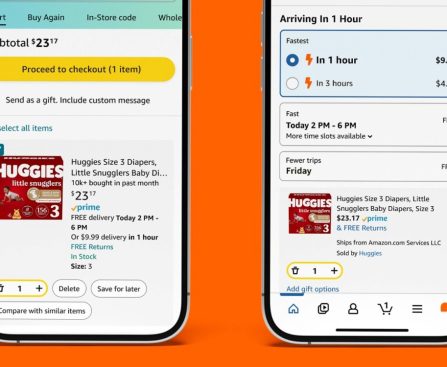
New 1-hour and 3-hour delivery choices are set to launch for more than 90,000 products on Amazon across the US.

Amazon states that 1-hour delivery is currently available in “hundreds of cities and towns across the U.S.,” while 3-hour delivery can be found in “over 2,000 cities and towns.” The intention is to widen the availability of these expedited delivery options to additional regions in the coming months.

You can check if your location qualifies for 1-hour or 3-hour delivery by visiting [amazon.com/getitfast](https://amzn.to/4cNCVN9).

If you are situated in a qualifying area, these delivery methods come with additional charges:

– $9.99 for 1-hour delivery for Prime members, and $19.99 for non-members
– $4.99 for 3-hour delivery for Prime members, and $14.99 for non-members

According to Amazon’s press announcement:

> Customers will notice products that qualify for 1-hour and 3-hour delivery throughout their standard Same-Day shopping experience via new indicators next to the product names. To enhance customer browsing of this selection, we’ve also introduced “in 1 hour” or “in 3 hours” search filters and a dedicated [storefront](http://www.amazon.com/getitfast) shopping page in regions where these options exist.

Given Amazon’s past, it is probable that the company will eventually aim to lower these charges and establish even quicker delivery as the standard. Alternatively, it could increase Prime membership fees and make 1-hour and 3-hour options more attainable through a ‘Prime Ultra’ tier.

Would you consider paying $4.99 or $9.99 for expedited Amazon delivery? Share your thoughts in the comments.

Ex-Scaleup Leaders Launch Operator Circle VC to Support Europe’s Next Decacorn

Dozens of executives from European tech scaleups have backed a new venture firm built on the thesis that people who have scaled billion-dollar companies know which founders can do it again. For years, the criticism of European venture capital has been structural: too few firms willing to write large cheques, and too little operational experience […]

This story continues at The Next Web

Tech Giants, Including Google, Meta, and Amazon, Sign Global Accord to Share Scam Intelligence

The Industry Accord Against Online Scams and Fraud, announced at the UN Global Fraud Summit in Vienna, commits 11 companies to share threat intelligence and coordinate defences against AI-driven fraud at scale. When Google’s vice president of trust and safety stood up at the United Nations Global Fraud Summit in Vienna on Sunday to announce […]

This story continues at The Next Web

Crucial Actions to Configure Your Fresh Smart TV Right Away

one or more stores to view your smart TV in action prior to bringing it home. Yet now that it’s settled in your entertainment center, you might be pondering whether you should take any specific actions with it before diving into a movie, show, or video game.

It merely requires a few minutes to complete a TV’s initial setup, but there are several additional features and settings that are worthwhile to explore before you begin watching or playing. These are the types of extra steps that could significantly influence aspects like picture quality and your TV’s internet-connected performance.

If you prefer to delay adjusting features and settings for the moment, you can always return to our subsequent list of recommendations in the future. For those eager to start optimizing right away, let’s proceed.

Install the newest firmware

Connecting your smart TV to the internet is likely one of the initial steps you’ll be encouraged to take during setup. As you might expect, a network connection is necessary to access streaming applications and smart home capabilities, but it’s also a primary way to download and install firmware updates. Before proceeding with anything else on your smart TV, we strongly advise installing the most recent firmware.

There’s a strong possibility that you’ll be asked to complete an update before leaving the setup wizard, and you might even be able to configure automatic updates. TV firmware can influence everything from format compatibility and app efficiency to user safety, and it’s one of the few methods for manufacturers to resolve bugs and glitches remotely. That said, if you didn’t intend to connect your TV to the internet, most television manufacturers offer a support page, which generally provides the latest firmware files.

You will need access to a web browser to download these update packages, and it’s typically advisable to transfer them to a 32GB USB drive or smaller that is formatted to exFAT or FAT32. Once the firmware is on your drive, plug it into the USB port on your TV, at which point the actual update process should commence.

Modify your picture settings

<div class="

Creative Methods to Reutilize Your Outdated Audio Devices

hifi audiophile devices from years past frequently enjoy sharing stories about their initial purchase. They reminisce about the experiences of setting it up, fine-tuning it, enhancing it, and enjoying legendary songs. Parting with it can be challenging. Sometimes, you may possess a good audio setup but have upgraded to something more advanced and still want to utilize your older equipment. To minimize clutter, you might consider sites like Craigslist to sell it or give it to a friend or family member. However, keeping it in your home can also be a wise choice. There are numerous ways to continue enjoying an old audio system, even if you’ve moved on to a more sophisticated one for your primary listening space.

The simplest solution is to relocate it to a different room and serve it as a secondary audio setup. Yet, you can accomplish more than just relocating it. You can enhance it in innovative ways, link it to various systems or audio devices you might have overlooked, and perhaps even use it for outdoor movies or party playlists.

Transform it into a computer speaker system