The Defense Department said concerns that Anthropic might “attempt to disable its technology” during “warfighting operations” validate its decision to label the AI firm a supply chain risk.

Download Premium Little Finder Guy 5K Backgrounds
### Apple’s Charming Little Finder Character: A Fresh Chapter for the MacBook Neo
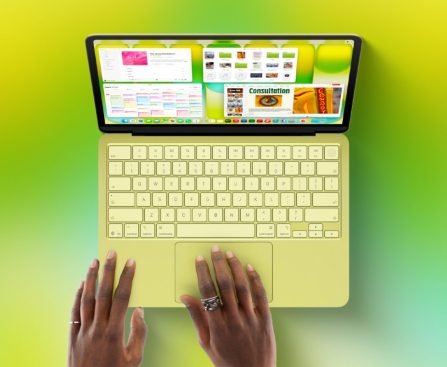
Apple has recently unveiled an adorable character known as the “Little Finder Guy” to advertise its newest offering, the MacBook Neo. This delightful incarnation of the Finder icon is part of a promotional strategy aimed at captivating a younger audience, particularly Gen Alpha, who are just beginning to enter the education sector. The campaign is mainly featured on TikTok, a platform that resonates strongly with this age group.
#### The Little Finder Guy
The Little Finder Guy is crafted to be a lovable mascot that encapsulates the spirit of Apple’s user-friendly interface. Its creation has generated enthusiasm among fans and tech aficionados alike, leading to an influx of imaginative content inspired by this character. Notably, PCalc developer James Thompson has transformed the Little Finder Guy into a series of impressive 5K wallpapers, enhancing its allure.
#### Wallpapers and Visual Charm
Thompson’s wallpapers come in diverse styles, with three showcasing the classic blue and white color scheme associated with Apple, while two others adopt a more vibrant color palette. These wallpapers not only provide a visual delight but also evoke nostalgia for long-time Apple users, reminiscent of the iconic iMac G3 design. Stephen Hackett, a noted figure in the Apple community, has published these wallpapers on his site, 512 Pixels, allowing users to conveniently download them in full 5K resolution.
#### Focusing on Gen Alpha
Apple’s marketing approach for the MacBook Neo particularly targets individuals who have never owned a Mac before. By focusing on Gen Alpha, Apple seeks to build a connection with the younger generation, motivating them to engage with its ecosystem from an early stage. The quirky advertisements featuring the Little Finder Guy are crafted to grab attention and foster a sense of familiarity with the brand.
#### Conclusion
The launch of the Little Finder Guy and the accompanying 5K wallpapers signifies a substantial advancement in Apple’s endeavors to refresh its image and connect with a younger audience. By utilizing platforms like TikTok and producing engaging content, Apple is not merely promoting its products but also nurturing a new generation of devoted customers. The Little Finder Guy transcends being just a marketing ploy; it signifies an innovative method of engaging with users in a digital era.

Apple Confronts ‘Vibe Coding’ Approaches in iPhone Application Development, Say Developers
AI is transforming app creation, making it more reachable for both developers and non-developers. Nevertheless, a recent report indicates that Apple’s App Store may not be entirely supportive of these innovations. The firms behind two “vibe coding” applications, which permit users to develop software merely by inputting text prompts into an AI system, have reported that Apple is pushing back against this category of applications.
As detailed in a report by Stephanie Palazzolo and Aaron Tilley for The Information, Apple has been limiting updates for AI vibe coding apps such as Replit and Vibecode. These applications allow users to craft games and other tools, yet Apple has allegedly insisted that they implement changes prior to releasing updates on the App Store.
This scenario arises from Apple’s understanding of the current App Store regulations rather than a fresh policy. Apple has informed certain developers that the vibe coding features of their apps contravene established guidelines. Specifically, Apple contends that apps cannot run code that modifies their functionality or that of other apps. This restriction coincides with the emergence of vibe coding applications, which present a potential threat to Apple’s revenue model by enabling the creation of web apps not requiring an App Store listing.
The fundamental concern lies in Apple’s policy that forbids apps from altering their functionality after undergoing the App Store review process. Vibe coding apps empower users to make significant modifications to their applications, but such changes happen locally on the user’s device rather than being disseminated via the App Store.
Apple’s App Store Guideline 2.5.2 clearly states that apps must be self-contained and cannot access or modify data outside their assigned container. They are also restricted from downloading or executing code that changes the app’s features or functionality. Although educational apps can, under specific circumstances, download executable code, they are required to ensure that the source code is completely viewable and editable by the user.
The Information implies that a possible resolution for at least one of the vibe coding apps might involve generating app previews in a web browser instead of within the app.
Interestingly, while Apple is enforcing limitations on vibe coding apps in the App Store, it has also adopted “vibe coding” technology within its Xcode development environment. Recently, Apple integrated support for collaboration with OpenAI and Anthropic’s agentic coding tools, signifying a complex interaction with the evolving realm of AI in app development.
For additional information, the complete report can be accessed via The Information.
DLSS 5: Has Nvidia’s AI Graphics Technology Gone Too Far?
Nvidia has revealed a new â3D guided neural rendering modelâ called DLSS 5 that can change a gameâs lighting and materials in real-time, and⦠many gamers arenât happy. From DLSS 5 memes to complaints about how itâs âyassifiedâ Resident Evil Requiem characters in demos, the first impression has not been a good one, no matter […]

Nvidia’s Disconnect with Gamers
Nvidia surely thought it was doing a good thing for gamers by “upgrading” the faces of our favorite video game characters. But that just shows how much the company has lost the plot. Nvidia could’ve marketed its new DLSS 5 real-time lighting technology as a way to make future, next-gen games look better. Instead, it […]

The EV Retreat: Obstacles, Cancellations, and Delays
The auto industry bet big on electric vehicles, but now those ambitious goals are falling apart. Demand was already slowing down when Donald Trump took office and took an ax to pro-EV policy: the elimination of the federal EV tax credit, kneecapping clean energy, and bulldozing emissions rules. Tariffs have been taking their toll as […]

5 Configurations to Improve Audio Quality on Your AirPods Pro
best wireless earbuds for audiophiles in tech evaluations and consumer feedback – and for valid reasons. They provide exceptional sound performance and equally remarkable noise cancellation and transparency features. Additionally, when compared to standard AirPods, they offer innovative functionalities, such as heart rate monitoring and extended listening duration.
Since the AirPods Pro function effectively right from the start, users may consider the standard settings satisfactory. However, the earbuds are actually quite adaptable, as they present various enhancements for sound quality and noise cancellation. You can easily locate some of these adjustments in the AirPods Pro menu, while others are buried deeper within the settings in the Settings app. If you aim to maximize your Pro model, whether it’s the original or the latest iterations, we will guide you through some clever adjustments to accomplish that.
Use the correct-sized ear tips
Marinel Sigue/BGR
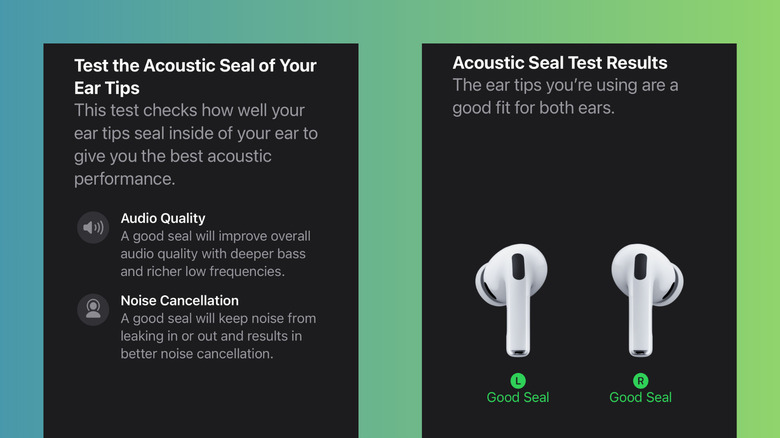
All three AirPods Pro versions come equipped with medium ear tips already attached to the earbuds. This may seem convenient, but to enhance their audio performance further, it’s essential to identify the proper ear tip size for you. The ideal ones ensure a snug fit that seals your ear, guaranteeing you receive deep bass from your music, enhanced noise isolation, and precise heart rate data from the AirPod Pro 3’s integrated sensor. They should also feel comfortable enough for all-day use. If you’re already comfortable with the medium ear tips, you can stick with them. If not, follow these steps:
- Take another set of ear tips from the Air Pod Pro package. Ear tips from different generations will not fit.
- Swap out the original ear tips.
- Wear the AirPods for approximately 15 minutes while moving around.
If the earbuds come loose, attempt a larger size. If they create uncomfortable pressure inside your ear, try a smaller size. If multiple sizes feel appropriate, you can determine the best one by checking their acoustic seal on your iPhone. To do so
Multiply Secures $9.5M to Develop AI Agents that Refresh B2B Ad Campaigns

The San Francisco startup emerges from stealth with Mayfield backing and a pitch that treats ad creative as a continuous learning loop, not a quarterly deliverable. Every B2B marketing team knows the problem. A campaign launches, the creative is fresh, the targeting feels right, and then, slowly, it starts dying. Audiences tune out. Click rates […]
This story continues at The Next Web
March Madness 2026 Deals: Free Food Offers from TGI Fridays, Buffalo Wild Wings, Grubhub, and More
The best March Madness 2026 deals. Get free food from TGI Fridays, Buffalo Wild Wings, Grubhub, and more.

MacBook Neo Proficient in Managing 4K Video Editing and 59 Chrome Tabs Seamlessly
**The MacBook Neo: A Real-World View on Video Editing**
In the continuously changing realm of technology, the discussion between tech critics and actual users frequently results in diverging views, especially regarding the capabilities of devices like the MacBook Neo. Recently, Sam Henri Gold authored an insightful blog entry addressing this very issue, highlighting the gap between theoretical suggestions from critics and the practical experiences of regular users.
Gold reminisces about his own childhood, recalling his video editing on a hand-me-down Mac. Despite working with a 2006 Core 2 Duo iMac with minimal RAM and storage, he found enjoyment in video editing, proving that the right equipment isn’t solely determined by specifications. He contends that while technology critics may not endorse the MacBook Neo for demanding tasks like video editing, many users will discover it sufficient for their purposes.
Backed by Gold’s viewpoint, Tyler Stalman carried out experiments with Final Cut Pro on the MacBook Neo, demonstrating its performance in real-life settings. Stalman observed that although the device might deplete its RAM and resort to swap memory, this didn’t impede his editing process. He managed to edit both 1080p and 4K videos without facing major performance challenges.
In a similar vein, Roman Loyola from Macworld reiterated these results while utilizing Adobe Premiere Pro. He shared a smooth editing experience, even when the MacBook Neo had to depend on swap memory. Remarkably, the most demanding application was Google Chrome, which he pushed to its extremes with 59 open tabs. Nevertheless, the MacBook Neo sustained its performance, allowing for uninterrupted navigation and multitasking.
Gold’s observations and the ensuing tests by Stalman and Loyola underscore a vital point: the MacBook Neo may not fit the traditional definition of a high-performance video editing device, but it effectively handles such tasks for many users. This highlights the significance of real-world application over theoretical assessments, as personal experiences can frequently unveil the genuine capabilities of a device.
In summary, the MacBook Neo serves as evidence that technology ought to support the user, irrespective of what critics may assert. As an increasing number of individuals pursue their creative endeavors with this machine, it is evident that the MacBook Neo is more than merely a tool; it is a gateway for aspiring creators to realize their visions.