Nvidia’s networking business raked in $11 billion last quarter despite getting significantly less fanfare than chips and gaming.

macOS 26.4 Release Notes: Summary of Six Fresh Features Launched by Apple for Mac
### Informative Article on macOS Tahoe 26.4
Apple has just launched the macOS 26.4 Release Candidate (RC) for developers and public beta testers, presenting a variety of new features and improvements aimed at enhancing the user experience for Mac users. This update reflects Apple’s persistent dedication to refining its operating systems and equipping users with cutting-edge tools and capabilities.
#### What’s New in macOS Tahoe 26.4?
The release notes for macOS 26.4 showcase several notable updates:
1. **New Emoji**: This update adds eight fresh emoji, such as an orca, trombone, landslide, ballet dancer, and a distorted face, broadening the emoji keyboard for more expressive conversations.
2. **Compact Tab Bar in Safari**: A new compact tab bar feature in Safari enables users to optimize their browsing area and search directly from the active tab, improving the overall browsing experience.
3. **Enhanced Freeform Features**: The Freeform app now offers advanced tools for image creation and editing, alongside a premium content library, seamlessly integrating with Apple Creator Studio for enhanced creative opportunities.
4. **Urgent Reminders**: Users now have the ability to mark reminders as urgent through a keyboard shortcut and sort these urgent reminders in their Smart Lists, streamlining task management.
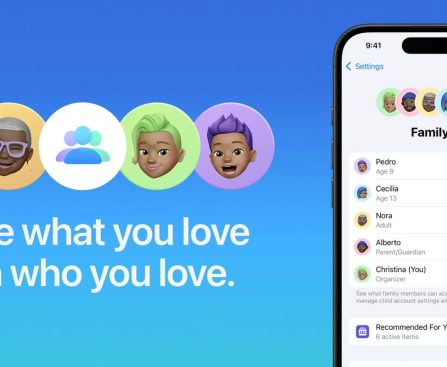
5. **Purchase Sharing in Family Sharing**: This capability permits adult members of Family Sharing groups to utilize their own payment methods for purchases, removing the necessity of depending on the family organizer for transactions.
6. **Improved Subtitle and Caption Settings**: Subtitle and caption settings are now more easily accessible while watching media, featuring a real-time preview directly from the captions icon, thereby enhancing accessibility for users.
#### Release Date
With the macOS 26.4 Release Candidate now accessible, the final version is expected to be available to all users as soon as next week. This prompt rollout illustrates Apple’s approach to consistently enhancing its software offerings.
#### Conclusion
The macOS Tahoe 26.4 update introduces a range of new features that address the varied needs of Mac users, from improved communication tools to enhanced browsing and media consumption experiences. As users anticipate the official release, the enthusiasm surrounding these updates underscores Apple’s commitment to innovation and user satisfaction.

iOS 26.4 Launches Personal Payment Options for Family Sharing Participants
### Family Sharing Receives a Much-Needed Billing Update in iOS 26.4
With the launch of iOS 26.4 RC, Apple has tackled one of the major drawbacks of its Family Sharing feature, which has been operational since its debut in June 2014. This upgrade presents a new billing structure that enables adult family members to use their own payment methods for transactions instead of depending solely on the family organizer’s credit card.
#### The Development of Family Sharing
From its beginning, Family Sharing has experienced numerous improvements, incorporating features like Apple Cash Family and Apple Credit Card Family. Nevertheless, the fundamental billing model stayed the same, with all purchases made by family members being charged to the organizer’s credit card when purchase sharing was activated. This limitation frequently caused frustration among users desiring more leeway in handling their purchases.
#### New Purchase Sharing Functionality
The most significant alteration in iOS 26.4 RC is the rollout of a new Purchase Sharing feature. As per the release notes, adult members of Family Sharing groups can now leverage their own payment methods for transactions, removing the necessity to rely on the family organizer. This modification is anticipated to enhance the overall user experience by granting greater independence to family members.
#### Revised Support Documentation
Alongside the software update, Apple has also updated its support documentation related to Family Sharing. The revised text clarifies that while the family organizer covers all purchases when Purchase Sharing is enabled, adult family members have the option to utilize their own payment methods for their transactions. This change highlights the newly found flexibility and authority that adult members now possess within the Family Sharing system.
#### Conclusion
The iOS 26.4 RC update signifies a major advancement in the Family Sharing experience, addressing a long-standing issue among users. By empowering adult family members to manage their own purchases, Apple is improving the capabilities of Family Sharing, rendering it more user-friendly and suitable to the needs of families. For further information on the additional enhancements included in iOS 26.4, users can consult the official release notes.
Apple Engaged in AI Lawsuit Concerning Data Set Not Utilized for Apple Intelligence
**Apple Involved in AI Lawsuit by Chicken Soup for the Soul**
In a notable legal development, Chicken Soup for the Soul, a prominent book publisher, has initiated legal proceedings against various leading technology firms, including Apple, accusing them of unauthorized utilization of its copyrighted material to train artificial intelligence systems. The lawsuit was lodged in a federal court in California and underscores concerns regarding copyright violations in the swiftly advancing domain of AI.
As reported by Reuters, the lawsuit implicates not just Apple but also other tech behemoths such as Google, Nvidia, Meta Platforms, OpenAI, Anthropic, Perplexity AI, and Elon Musk’s xAI. Chicken Soup for the Soul alleges these companies exploited pirated versions of its publications to bolster the functionality of their AI chatbots, thus infringing upon the rights of innumerable authors whose works were allegedly appropriated.
The lawsuit contends that the defendants partook in a “deliberate act of theft” by unlawfully reproducing extensive amounts of copyrighted material without securing the requisite permissions. This content was reportedly utilized to develop and refine commercial large language models (LLMs) and improve various AI offerings. The complaint stresses that the actions of these corporations not only breach copyright statutes but also diminish the creative endeavors of authors, comprising bestselling writers and Pulitzer Prize-winning journalists.
A particular issue in the lawsuit is the mention of “The Pile,” a dataset that Chicken Soup for the Soul claims was employed to train Apple’s Foundation Models. The lawsuit asserts that the defendants downloaded pirated editions of the publisher’s books from shadow-library websites, including The Pile, LibGen, Z-Library, and Anna’s Archive, and integrated these works into their AI frameworks without appropriate licensing.
This legal case is not the first instance of Apple being scrutinized for its AI training methodologies. Earlier in 2024, Apple was accused of leveraging YouTube videos in a comparable scenario. At that time, the company asserted that the dataset in question was used exclusively for research purposes and not in any models fueling Apple Intelligence or its machine learning capabilities.
As the lawsuit unfolds, it remains uncertain how Apple’s prior claims regarding its dataset usage will influence the case. The outcome could bear significant repercussions for the tech sector, especially concerning the ethical and legal limits of employing copyrighted materials in AI development.
The complete lawsuit can be accessed [here](https://fingfx.thomsonreuters.com/gfx/legaldocs/movaolmqqva/CHICKEN%20SOUP%20AI%20COPYRIGHT%20LAWSUIT%20complaint.pdf).

watchOS 26.4 Resolves Major Concern in Apple Watch Workout Application
Apple revamped the Workout app in watchOS 26, but the new Apple Watch exercise tracking experience hasn’t been universally embraced. It appears Apple has been attentive, as watchOS 26.4 tackles a significant issue with the updated design.
## watchOS 26.4 enhances Workout app user experience
A prevalent dissatisfaction with the Workout app on watchOS 26 is its sluggishness and the need for increased interactions to commence a workout. The redesign marks a substantial shift after a decade of using the Apple Watch Workout app in a particular manner. The current design also feels somewhat less intuitive. The issue lies in what used to function like a tappable button in the former design now being merely a decorative element that disregards your tap.
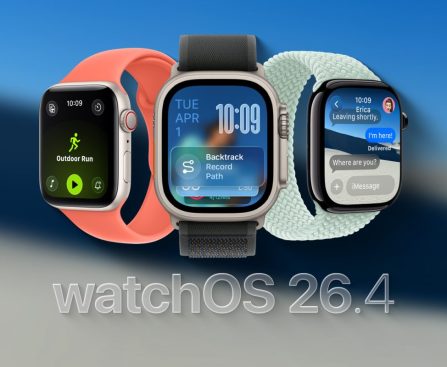
However, with watchOS 26.4, Apple is modifying the existing design of the Workout app to meet user expectations. According to the release notes: **Workout type icon in the Workout app allows you to initiate a workout with one tap.** Voilà, that’s the solution people have been seeking. Now, the workout icon/label and the play button perform the same precise action: begin tracking your workout.
Tapping the icon from the list view still necessitates the full workout view to load. If you tap the workout icon quickly while the list is still visible, your tap will still be ignored. That’s another area where improvements can be made, but the watchOS 26.4 update represents a significant user experience enhancement from the behavior seen in watchOS 26.0 to 26.3.
## What went wrong and how Apple rectified it
Before watchOS 26.4, the Workout app displayed a scrollable list of workout type icons and labels. Naturally, users would expect that tapping the workout icon from the list would initiate the process. Instead, the complete workout layout had to load, and tapping the central workout type icon had no effect.
The design seemed more focused on preventing accidental workout starts. It may also encourage users to pause and examine the new layout while prompting them to tap the buttons in the four corners before beginning their workout. These are intended for adjusting Workout Views, Goals and Targets, Media, and Workout Buddy and Alerts. It wasn’t exactly tailored for speed or previously developed muscle memory.
Rather, a “Play” icon was the sole means of starting the workout. This already creates a confusing mix of metaphors since you’re logging a workout and not playing a session. Regardless, watchOS 26.4 resolves this tangled situation with the straightforward adjustment mentioned above.
Personally, I had become accustomed to the new behavior after transitioning from watchOS 26.0 to watchOS 26.3 since June. Still, I appreciate that Apple is responding to feedback and enhancing user experience. The new design still felt slower in the back of my mind. There was something about the placement of the bottom center play icon that made me want to scroll up, especially given that the center icon had no function.
Regardless, the aim should be to ensure a fantastic first run experience, rather than to adjust to a less intuitive system after repeated use. It’s encouraging to see this addressed in watchOS 26.4.
## Apple Watch update availability
watchOS 26.4 is currently available in beta as a release candidate. The final version is expected to be released next week.
Current Top MacBook Deals
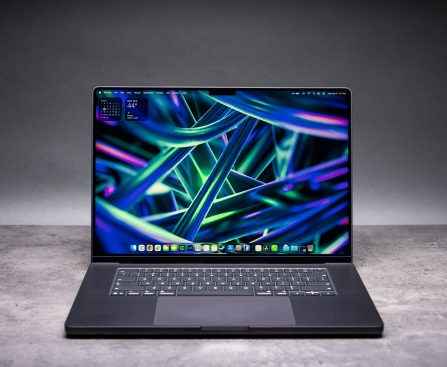
Itâs 2026, and that means Apple sells MacBooks equipped with not just its capable M-series processors but A-series chips that were previously exclusive to the iPhone. With the MacBook Neo starting at $599, the company now offers a wider range of options with more sizes and price points than ever before, all of which run […]
New Study Discloses AI’s Influence on Brain Activity
**New Research Reveals the True Impact of AI on Your Brain**
AI was intended to simplify our work processes and enhance efficiency. Nevertheless, a study from Harvard Business Review indicates that employees assigned to manage various AI agents within their daily routines reported no simplification of their tasks. Instead, it heightened their workload. The authors point out that rather than providing assistance, the integration of multiple AI systems into the workflow might even result in mental exhaustion, thereby directly influencing cognitive function. This isn’t the first instance of studies highlighting AI’s potential effects on the brain. Earlier research from MIT demonstrated that an over-dependence on AI was leading to a decline in critical thinking abilities. Furthermore, a range of other studies have raised similar alarm bells: ChatGPT may be diminishing users’ intelligence.
Clearly, the concern emerging from this latest research differs slightly, as it concentrates more on the fatigue and cognitive cloudiness induced by prolonged AI use. However, it remains a significant facet of AI deployment to examine, particularly as we observe an increasing number of AI applications being introduced on our desktops and mobile devices—such as the latest AI browsers that claim to handle our daily responsibilities—thus prompting this study to explore the ramifications of AI usage in a professional setting.
**Excessive AI Can Be Detrimental**
According to the findings presented in the HBR study, the application of AI technologies isn’t entirely detrimental, at least regarding productivity. In fact, the researchers noted that when utilizing one, two, or even three AI tools simultaneously, participants reported heightened productivity. However, this boost waned as additional tools were incorporated. Moreover, upon transitioning to a fourth tool, the workers’ productivity actually decreased. Consequently, the AI ceased to facilitate efficiency and instead became a burden for the human brain. This was particularly noticeable in instances requiring oversight, where workers needed to monitor the AI more attentively.
These results aren’t particularly surprising, since the concept of multitasking has proven to be significantly less productive than commonly believed. The fundamental science supporting this notion does not shift merely because the tools change. But how significantly does multitasking with AI tools impact the brain? To investigate, the researchers queried participants about their experiences with mental fatigue directly linked to the “overuse, interaction with, and/or oversight of AI tools beyond cognitive limits.” Approximately 14% of participants acknowledged experiencing what the authors termed “AI brain fry.”
The concept of “cognitive capacity” highlighted by the authors is particularly captivating. Although they anticipated individuals would likely encounter mental fatigue during their study, there was an unforeseen result: burnout.
**Prepare for AI Brain Fry**
It’s tempting to regard burnout merely as someone emotionally and physically exhausted. However, it runs much deeper, with both the HBR authors and the CDC asserting that burnout correlates with not only physical and emotional exhaustion but also mental fatigue. In this context, mental fatigue seems to be directly associated with managing AI tools far beyond the human brain’s capacity. One participant characterized using several AI tools as akin to juggling a multitude of tabs in their mind, each vying for attention.
This ongoing struggle to navigate through information is bound to lead to complications over time. Eventually, it could result in the worker confronting information overload once a certain threshold is crossed. This aspect alone is more than sufficient to contribute to employee burnout, as previous studies have indicated, and these latest findings appear to partially validate that.
However, it is crucial to acknowledge that not all uses of AI seem to impose these same negative effects on cognitive function. Furthermore, employing AI to minimize time spent on repetitive tasks appears to reduce burnout risk. Given the early stage of AI’s widespread integration, forthcoming research like this may delve deeper into the potential issues identified here and, hopefully, enhance our understanding of them.

16 Noise-Cancelling Headphones and Earbuds on Sale Before Amazon’s Big Spring Sale
Amazon’s Big Spring Sale doesn’t start until March 25, but we spotted deals on noise-cancelling headphones and earbuds from Sony, Bose, Apple, and Beats worth checking out ahead of time.
Research Shows Teen Girls Utilizing AI for Creating Sexual Imagery
Nudification tools are surprisingly popular with teen girls. Researchers wonder why.

Amazon Reportedly Reschedules Annual Prime Day Sale
Amazon is reportedly planning to move up its annual Prime Day sale from July to June this year, according to Bloomberg.