SmartGym Unveils Significant Update Including Stretch Recommendations, Routine Portions, and Improved Training Load Monitoring

# SmartGym Update: Improved Customization and Quality-of-Life Enhancements

App Store Award recipient [SmartGym](https://apple.co/3VivS53) has just unveiled an update that brings a wide array of customization features and overall enhancements designed to enrich user experience. This article explores the newest functionalities that elevate SmartGym as an even more adaptable workout companion.

## SmartGym: An All-Encompassing and Customizable Fitness Application

Last month, SmartGym introduced a major update that featured Strava integration along with enhanced sharing capabilities. The new update builds upon this groundwork, equipping users with a more robust tool for personalizing their workout experiences.

### AI-Enhanced Smart Trainer Improvements

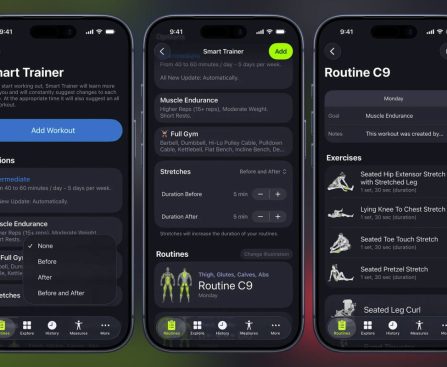
A highlight of the update is the AI-optimized Smart Trainer, which now recommends warm-up and cool-down stretches specifically designed for the muscles engaged in a user’s workout. Users can adjust the duration of these segments and choose if they should contribute to their overall workout and muscle recovery metrics.

### Adaptive Workout Routine Organization

Users can now classify their exercise sets into clear categories: Warm Up, Main, and Cool Down. This organization simplifies the addition or elimination of segments, proving especially useful for longer workouts with multiple exercises. Moreover, a new draft feature saves incomplete routines automatically, allowing users to pick up their workouts later without losing any progress.

### Launching Workout Effort Monitoring

Another notable addition is the Workout Effort functionality, which permits users to define the training load for their sessions. This capability assists users in tracking their cumulative training load and recovery status, providing a more holistic perspective on their fitness journey.

### Redesigned Routine Interface

The update also brings a revamped Routine View, which SmartGym identifies as the most frequently used screen in the application. The overhaul emphasizes improving layout, typography, animations, and notifications, thereby enriching the overall user experience from the first interaction to the final set.

### Simplified Exercise Updates

For users who utilize the same exercise throughout various routines, SmartGym now allows the modification of an exercise in one routine or across all routines at once. This feature optimizes workout plan management, conserving users’ time and effort.

## 9to5Mac’s Viewpoint

As a dedicated SmartGym user, I wholeheartedly endorse it for its versatility and seamless compatibility with Apple devices, such as the Apple Watch, iPhone, iPad, Mac, and Apple Vision Pro. The app features an extensive collection of exercises and emphasizes customization, making it an essential tool for anyone aiming to enhance their workout routines.

For those participating in physical activities, whether at a fitness center or at home, SmartGym is a worthy consideration. It is [accessible for free on the App Store](https://apple.co/3VivS53), with in-app subscriptions that offer added benefits.

## Conclusion

The recent update to SmartGym greatly improves its capabilities, transforming it into a more comprehensive and customizable fitness app. With features such as AI-driven warm-up recommendations, enhanced workout structuring, and efficient exercise management, SmartGym is continuously advancing as a preferred choice for fitness aficionados.
WWDC 2026: Anticipated Dates and Expectations

# WWDC 2026: Anticipations for Apple’s Annual Developer Conference

A thrilling period for Apple enthusiasts is on the horizon. The Worldwide Developers Conference (WWDC) occurs each June, and this year will signal the highly awaited rollout of iOS 27 among other innovations.

## When Will Apple Reveal WWDC 2026?

Apple generally discloses WWDC in March. Here’s a recap of announcements from previous years:

– **2017:** February 16
– **2018:** March 13
– **2019:** March 14
– **2020:** March 13
– **2021:** March 30
– **2022:** April 5
– **2023:** March 29
– **2024:** March 26

Given Apple’s pattern, it is likely that WWDC 2026 will be announced during the final week of March.

## When Will WWDC 2026 Take Place?

The conference typically occurs in the first or second week of June. Here are the dates for earlier WWDC events:

– **2017:** June 5-9
– **2018:** June 4-8
– **2019:** June 3-7
– **2020:** June 22-26
– **2021:** June 7-11
– **2022:** June 6-10
– **2023:** June 5-9
– **2024:** June 10-14
– **2025:** June 9-13

Drawing from previous trends, WWDC 2026 is anticipated to occur from June 8 to June 12, with the keynote event commencing on Monday, June 8.

## WWDC 2026: Anticipated Highlights

During WWDC, Apple is set to reveal its upcoming suite of operating systems for all its devices, including:

– **iOS 27**
– **macOS 27**
– **visionOS 27**
– **watchOS 27**
– **tvOS 27**

Speculation indicates that iOS 27 will prioritize bug fixes and enhance overall stability. The update is also expected to establish a foundation for the inaugural foldable iPhone, which is rumored to debut later this year. Moreover, Apple is advancing its new Apple Intelligence features and plans to present the functionalities showcased at WWDC 2026.

## WWDC 2026: Conclusion

What are you eagerly awaiting at WWDC 2026? What are your aspirations and wishes for iOS 27 and other updates this year? Share your thoughts in the comments.

Fitbit’s AI Health Coach Will Soon Access Your Medical Records

Would you share your medical records with a personal trainer? How about a virtual one? Google, which this week announced it is giving Fitbit’s AI health coach the ability to read your medical records, is hoping the answer is yes, following rivals like Amazon, OpenAI, and Microsoft in betting that users are willing to trade […]

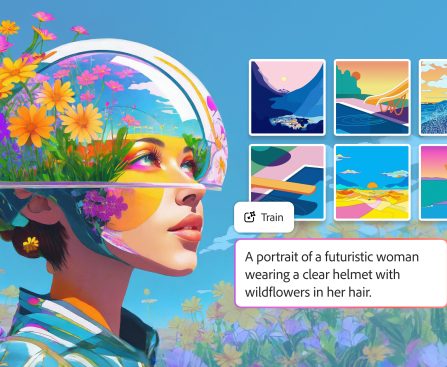
Adobe’s AI Image Generator Can Now Be Trained on Your Own Art

Adobe is launching customizable AI image generators that can mimic specific artistic styles and character designs. The Firefly Custom Models are available in public beta starting today, allowing creators and brands to train a model on their own assets to ensure generated images follow a consistent aesthetic for characters, illustrations, and photography. The tool aims […]

Tubi and TikTok Partner to Produce Long-Form Series

Soon, some of TikTok’s biggest personalities are going to be launching new streaming series on Tubi. Today, Tubi and TikTok announced that they are working together to launch a new Creatorverse Incubator that will help content creators produce long form original series for the Fox-owned streaming service. Once selected for the program, a group of […]

The Function of the Back Buttons on a Nintendo Switch 2 Pro Controller

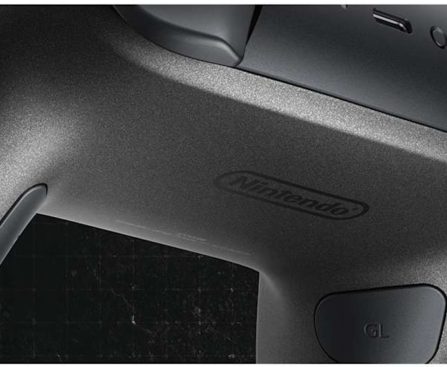
When the Nintendo Switch 2 debuted, it came with a variety of accessories, one of which is an updated Pro Controller. This device is nearly the same as the original Switch’s Pro Controller, but it features additional buttons, including two sizable paddles positioned within the gripping handles. By default, these buttons remain inactive, but you have the option to assign them functions if you desire.

These newly introduced buttons, marked “GL” and “GR” (don’t inquire about the meaning of the “G”), are engineered to integrate with the Switch 2’s button mapping capabilities, offering players more customizable and ergonomic gameplay options. Imagine you’re battling through a platforming time trial and need assistance reducing a few milliseconds from your best time. You could explore speed running techniques, or you might remap the jump action to either GL or GR, allowing you to keep your thumb on the right analog stick and navigate effortlessly through the virtual challenges.

The Switch 2 Pro controller marks the first official Nintendo accessory to feature back buttons. In contrast, if you wanted to utilize this functionality on the original Switch, it necessitated either acquiring a third-party Bluetooth device or employing a specific adapter to enable your Xbox or PS5 controller to function with Nintendo.

How to configure the back buttons on your Nintendo Switch 2 Pro Controller

As games seldom share the same button configurations — sequels excepted — the optimal way to assign tasks to the GL and GR buttons is by utilizing the Switch 2’s Quick Settings menu. While engaged in gameplay, press and hold the Home button until the menu appears. Navigate down to the “GL/GR Buttons” tab and select the button you wish to adjust. Choose it, then push the button you want it to replicate. Repeat this process for the other back button if desired, then exit Quick Settings. The game should identify the GL and GR buttons as one of the bumper, trigger, or face buttons. If you wish to change the function later, simply access Quick Settings again, choose the back button, and either opt for a new function or press the respective GL or GR button to restore its function to neutral.

Given that the console can remember games and their specific GL and GR assignments (one of those features you may not have realized your Switch 2 possesses), you can remap buttons on a per-game basis. However, if you prefer a universal function reassignment applicable to all titles, you can set that up from the console’s home screen. Go to the “System Settings” menu, scroll down to select “Accessibility,” then highlight the controller you wish to modify. Tap on “Edit Controller Mapping,” and then choose “GL/GR Button Settings.” From this point, remap the buttons as you would through the Quick Settings, return to the previous menu, and select “Save.” Once you complete this, your customized GL and GR buttons will be available for use across all games, including those you have yet to try.