Opera Neon Improves Agentic Browsing Experience with MCP Compatibility

**Opera’s Agentic Browser Incorporates AI Tools with MCP Support**

Opera has recently upgraded its agentic browser, Opera Neon, allowing users to link AI tools directly to their live browsing experiences. This integration enables real-time engagement with web pages, access to tabs, and the capability to execute actions smoothly, significantly enhancing user productivity.

### What is MCP?

MCP, or Model Context Protocol, is an open standard originated by Anthropic and later contributed to the Linux Foundation’s Agentic AI Foundation. This protocol acts as a universal standard that connects AI models to external systems, easing the integration of AI tools like ChatGPT, Gemini, and Claude into various platforms such as Notion, Google Drive, Slack, GitHub, and Zapier. As more platforms embrace MCP, users can utilize these integrations to boost their workflows.

### MCP on Opera Neon

Opera Neon, introduced as a subscription-based agentic browser, boasts native agentic tools aimed at enhancing user experience. Notable features include:

– **Tasks:** Independent workspaces that understand context, allowing users to analyze and act across multiple sources concurrently.
– **Cards:** A feature permitting users to save commonly used prompts, simplifying repetitive tasks.
– **Do:** An agentic browsing feature that navigates on behalf of the user.
– **Make:** A tool that generates widgets, self-sufficient apps, and reports based on user-input data or web searches.

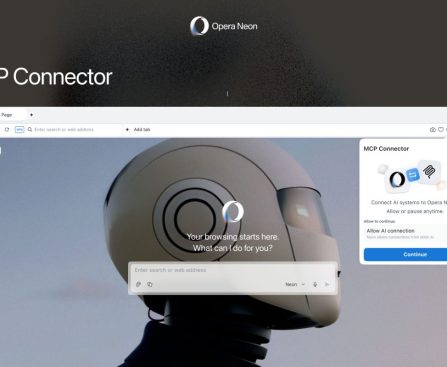
Recent enhancements to Opera Neon incorporate extensive research capabilities and integration with Gemini 3 Pro. The latest feature of MCP support enables AI tools such as ChatGPT, Claude, Lovable, n8n, and OpenClaw to access tabs, interact with web pages, and execute tasks on behalf of users.

This integration can greatly improve productivity by reducing context switching, allowing AI tools to pull information from open tabs, update documents, initiate automations, and complete multi-step tasks without necessitating continuous manual input.

While the advantages are most notable for users already acquainted with MCP-ready tools, this advancement acts as a valuable gateway for those eager to delve into new workflows within Opera Neon.

For more details on Opera Neon, visit [Opera Neon](https://www.operaneon.com).
Apple @ Work Podcast: Meeting Owl Pro 5 Tailored for IT Experts

### The Meeting Owl Pro 5: A Revolutionary Tool for IT Experts

In the changing world of remote work and hybrid gatherings, the demand for efficient communication tools has reached an all-time high. The Meeting Owl Pro 5, created by Owl Labs, is specifically crafted to meet these requirements with an array of IT-centric features that boost collaboration and simplify meeting experiences.

#### Main Features of the Meeting Owl Pro 5

1. **360-Degree Video and Audio**: The Meeting Owl Pro 5 features an innovative 360-degree camera that records video from every angle, making sure that all participants in the room are visible to those attending remotely. This immersive setup helps close the divide between physical and virtual meetings.

2. **Smart Zoom and Focus**: Leveraging cutting-edge AI technology, the device automatically zooms in on the individual speaking, facilitating easier engagement for remote participants. This function enriches the overall meeting experience by directing focus towards the current speaker.

3. **Superior Audio Quality**: Fitted with eight microphones, the Meeting Owl Pro 5 captures sound from every direction, ensuring clear audio. This clarity is vital for effective communication, as it reduces the likelihood of misunderstandings caused by subpar sound quality.

4. **Smooth Integration**: The device works with leading video conferencing platforms such as Zoom, Microsoft Teams, and Google Meet, allowing organizations to seamlessly incorporate the Meeting Owl Pro 5 into their current workflows without requiring extensive training or setup.

5. **Easy-to-Use Interface**: The Meeting Owl Pro 5 focuses on user-friendliness. Its intuitive controls and setup process enable users to concentrate on their meetings rather than dealing with technical issues.

6. **Remote Management Features**: For IT teams, the capability to manage devices from a distance is a significant benefit. The Meeting Owl Pro 5 can be overseen and updated via a centralized management system, ensuring that all devices operate efficiently and securely.

#### Why Opt for the Meeting Owl Pro 5?

Businesses aiming to elevate their meeting experiences will consider the Meeting Owl Pro 5 a worthy investment. Its blend of state-of-the-art technology, user-friendly design, and strong integration capabilities makes it an excellent option for organizations grappling with the challenges of hybrid work settings.

#### Conclusion

As remote work continues to define the future of business, tools like the Meeting Owl Pro 5 are crucial for promoting effective communication and collaboration. With its innovative features geared toward IT professionals, the Meeting Owl Pro 5 distinguishes itself as a premier solution for organizations seeking to enhance their meeting dynamics and guarantee that all participants, whether physically present or remote, can fully engage.

For additional insights on the Meeting Owl Pro 5 and its influence on workplace collaboration, tune into the latest episode of Apple @ Work featuring Frank Weishaupt, where he explores the device’s capabilities and its importance in today’s work landscape.

How to Safeguard Your Apple Devices on World Backup Day

# The Significance of Data Backup for Apple Users

There’s a famous saying that identifies two types of people in the world: those who have faced significant data loss and those who will face significant data loss. World Backup Day serves as an excellent reminder to make sure you’re safeguarded against being part of the latter group.

Luckily, Apple devices simplify the process of keeping them automatically backed up, yet it remains concerning how many users neglect to do this.

## The Dangers of Data Loss

The personal information we preserve on our Apple devices can be truly invaluable, with photos and videos being the most apparent instances. Consider the heartbreak of parents losing the recording of their child’s first steps. Many of us possess photos and videos that exist solely in digital form, making the thought of losing them unbearable.

There are numerous other forms of data whose loss could lead to significant issues. Picture losing your calendar information and being left without a record of future meetings, appointments, or plans. What if all your financial documents vanished and you were left to justify that to the IRS during the next tax season?

Additional examples that could lead to serious repercussions include losing all your saved passwords, Apple Notes, stored emails, and even cherished text messages.

One estimate suggests that approximately 140,000 hard drives fail weekly. Another estimate reveals that 113 phones are lost or stolen each minute.

## ‘One is None, Two is One’

Another saying in IT goes, “one is none and two is one.” This means that having just one copy of your data can swiftly turn into zero copies in the event of media failure. Having two copies can quickly reduce you to having just one under similar circumstances.

The best practice is to maintain a minimum of three copies of crucial data, with at least one stored offsite. Thankfully, cloud services make this remarkably easy to accomplish, requiring no effort after the initial setup.

## How to Back Up Your iPhone and iPad

The most straightforward and popular method for backing up your iPhone and iPad is via iCloud. As Apple limits the free tier to a mere 5GB, a paid subscription will be necessary for this.

1. Launch the Settings app, tap your name at the top, then select iCloud > iCloud Backup.
2. Ensure “Back Up This iPhone” is enabled. If not, turn it on and tap the Back Up Now button.
3. If you haven’t yet subscribed to iCloud+, navigate to Settings > iCloud and scroll to “iCloud+ features” then select the Manage Plan button.

You will need to choose whether to back up using mobile data or wait for a Wi-Fi connection. If you have unlimited data or a generous data plan, enabling the mobile data backup option is the safest choice.

While in the iCloud section, check the Saved to iCloud panel and tap See All. Confirm that all data you wish to secure is toggled on, including photos, email, passwords, notes, messages, calendar, contacts, and reminders.

As an alternative or addition to an iCloud backup, you can back up an iPhone to your Mac. However, storing a local backup at home leaves you at risk of losing all data in case of a house fire or natural disaster. Other options include third-party apps and external drives for iOS devices, along with additional cloud services like Dropbox. Nevertheless, iCloud backup is highly recommended due to its “set it and forget it” nature.

## How to Backup Your Mac Locally

Apple facilitates easy automatic backups through Time Machine, a robust automated backup feature for Macs. To set this up:

1. Connect a sufficiently large external drive to your Mac.
2. You will be prompted to decide whether to use it for Time Machine.

Time Machine generates versioned backups, meaning it saves incremental backups over various periods, rather than just the current contents of your Mac. This is beneficial when you delete a file and later realize you still need it. The larger the external drive, the more versions will be saved. Ideally, select a drive that is at least double the size of your Mac’s SSD.

You can save costs by opting for a spinning metal hard drive instead of an SSD. While the initial backup may take longer, it will easily keep pace afterward, and hard drives are significantly more affordable than SSDs.

For enhanced safety, consider using multiple external drives for Time Machine backups; your Mac will automatically alternate between them.

## Cloud Backups of Macs

The previous warning about the dangers of having only a locally stored backup still holds true. It is highly advisable to utilize a cloud service for storing copies of your most critical files.

Generally, your desktop and documents folders are the primary directories you’ll want to back up to the cloud.

Last Day: Best Apple Offers from the Major Spring Sale – AirPods Pro 3, MacBook, iPad, Accessories, and Beyond

**9to5Mac: Your Primary Destination for Apple News and Insights**

In the continuously changing realm of technology, being updated on the newest advancements, particularly within the Apple ecosystem, is essential for enthusiasts, professionals, and casual users alike. 9to5Mac has positioned itself as a top-notch source for breaking news, detailed analysis, and expert reviews concerning Apple products and services.

### Extensive Coverage

9to5Mac addresses a broad array of subjects, including:

– **Product Announcements**: Receive the latest news on fresh iPhones, iPads, Macs, and accessories as they are unveiled.
– **Software Releases**: Keep abreast of the most recent iOS, macOS, watchOS, and tvOS updates, featuring new functionalities and enhancements.
– **Market Insights**: Obtain perspectives on Apple’s business approaches, market patterns, and competitive environment.

### Unique Articles

For readers seeking thorough reporting, 9to5Mac delivers unique articles that explore the details of Apple’s operations and upcoming strategies. These pieces frequently contain insider knowledge and expert viewpoints that you won’t find elsewhere.

### Reviews and Guides

9to5Mac delivers thorough reviews of the newest Apple products, assisting consumers in making educated purchasing choices. Moreover, the site offers a variety of how-to articles that help users optimize their Apple devices’ capabilities, from troubleshooting advice to advanced usage methods.

### Stay Connected

To keep up with the rapidly changing landscape of Apple news, follow 9to5Mac on various social media platforms:

– **Twitter**: Obtain real-time updates and breaking news.
– **Facebook**: Connect with a community of Apple fans and share your opinions.
– **LinkedIn**: Network with professionals and industry experts.

### Multimedia Content

For those who prefer visual media, 9to5Mac also maintains a YouTube channel where users can access video reviews, tutorials, and discussions regarding the latest Apple news and products.

### Conclusion

Whether you’re an ardent Apple aficionado or simply aiming to remain informed about the latest tech developments, 9to5Mac serves as your premier source. With its dedication to providing accurate, timely, and enlightening content, it remains a reliable name in the domain of Apple news. Remember to visit [9to5Mac’s homepage](http://9to5mac.com/) for all the newest information and delve into the vast array of resources available.

Airbnb Introduces Private Car Transfers in Over 125 Cities

The new service, available from today across Asia, Europe, and Latin America, lets guests pre-book airport and station transfers directly in the Airbnb app. It’s not available in the US, Canada, or Africa, yet. Airbnb has launched private car transfers in more than 125 cities across Asia, Europe, and Latin America, partnering with UK-based airport transfer […]

This story continues at The Next Web

Enkei Secures Pre-Seed Funding at a €3M Valuation

ReCeramix™, made from over 90% recovered ceramic and construction waste, is already in use at Stockholm boutique hotel Ett Hem, members’ club Angel House, and Fotografiska. The round was valued at €3M; the raise amount was not disclosed. Stockholm startup Enkei has closed a pre-seed round at a €3 million valuation to commercialise ReCeramix™, its […]

This story continues at The Next Web

Qover Secures $12M in Growth Funding from CIBC

The Belgian embedded insurance orchestration platform, which backs Revolut, Mastercard, BMW, and Monzo, has tripled revenue over four years and now covers 15 million people across 32+ countries. Total funding crosses $100 million. Qover, the Belgian embedded insurance orchestration platform, is marking its tenth anniversary with a $12 million growth capital facility from CIBC Innovation […]

This story continues at The Next Web

Microsoft Pledges $1 Billion for Cloud and AI Infrastructure in Thailand

Brad Smith met Prime Minister Anutin Charnvirakul in Bangkok to announce the 2026-2028 investment spanning data centre infrastructure, cybersecurity, sovereign technology, and AI skills training for millions of Thai workers. Microsoft has announced a commitment of more than $1 billion in cloud and AI infrastructure in Thailand between 2026 and 2028, the company’s largest publicly […]

This story continues at The Next Web

Empirical Ventures Raises £10M from British Business Bank

Empirical Ventures, which backs what it calls “venture scientists”, PhDs building deeptech companies across energy, materials, and life sciences, has received a fresh £10M commitment via the BBB’s Regional Angels Programme, taking total support to £15M. Empirical Ventures, the Bristol-based deeptech fund co-founded by two scientists-turned-investors, has secured a £10 million commitment from the British […]

This story continues at The Next Web

Allbirds to Sell All Assets for $39M

The wool sneaker brand that briefly hit a $4 billion valuation in 2021 has agreed to sell all its assets and IP to American Exchange Group. The company is dissolving. Shares jumped 36% after-hours because $39M is still a premium over where they were already trading. Allbirds has agreed to sell all of its intellectual […]

This story continues at The Next Web