

Introduction
Software updates often bring new features, tools, and performance enhancements that improve user experience, but they can sometimes introduce unexpected problems. At Puget Systems Performance Lab, we continuously test and review hardware performance with new software updates to identify issues or improvements and share this information with our readers and the creative community.
In October 2025, Adobe launched version 15.0 of Lightroom Classic, introducing updates aimed at performance improvement. The following month, we released Puget Bench for Lightroom Classic version 1.0 to evaluate the new release. However, we discovered a bug in version 15.0 that reduced performance on Windows PCs, especially when building smart previews and exporting DNG files.
In February 2026, Adobe released version 15.2 of Lightroom Classic to fix various issues, and many bugs have been largely resolved. Significant performance differences between versions 15.0 and 15.2 were observed, leading us to publish a hardware performance analysis for version 15.2. This analysis focused on hardware-specific performance, but now we look at the overall performance boost from 15.0 to 15.2.
Test Setup (Expandable)
AMD Desktop
Intel Desktop 2
Apple M3 Max MacBook Pro
| CPU: Apple M3 Max 16-core |
| RAM: 64 GB (Unified) Shared Bandwidth: 400 GB/s |
| GPU: M3 Max 40-core |
| Storage: 2 TB Integrated Storage |
| OS: MacOS Tahoe 26.2 |
Intel Desktop 1
Puget Mobile 16″
Benchmark Software
The performance improvements observed stemmed from software upgrades in Lightroom Classic, prompting us to test various system configurations to demonstrate expected performance changes. We evaluated 5 different systems across workstation and laptop classes in both Lightroom Classic version 15.0 and 15.2, using Puget Bench for comparison.
Raw Results
We provide a spreadsheet of the data gathered from our testing with minimal processing. Given that Lightroom Classic performance can be camera-specific, this helps users focus on relevant performance areas. Below are tables showing the raw data:
Lightroom Classic v15.0 Raw Data
Lightroom Classic v15.2 Raw Data
Analysis
The chart below illustrates the relative performance of Lightroom Classic versions 15.0 and 15.2. The vertical axis lists the tested configurations, while the horizontal axis shows relative performance where version 15.0 is set to 100%. A score above 100% suggests a performance gain, with blue bars representing gains based on the Overall Score (extended) and green bars representing AI Score (extended) from Puget Bench for Lightroom Classic v1.0.
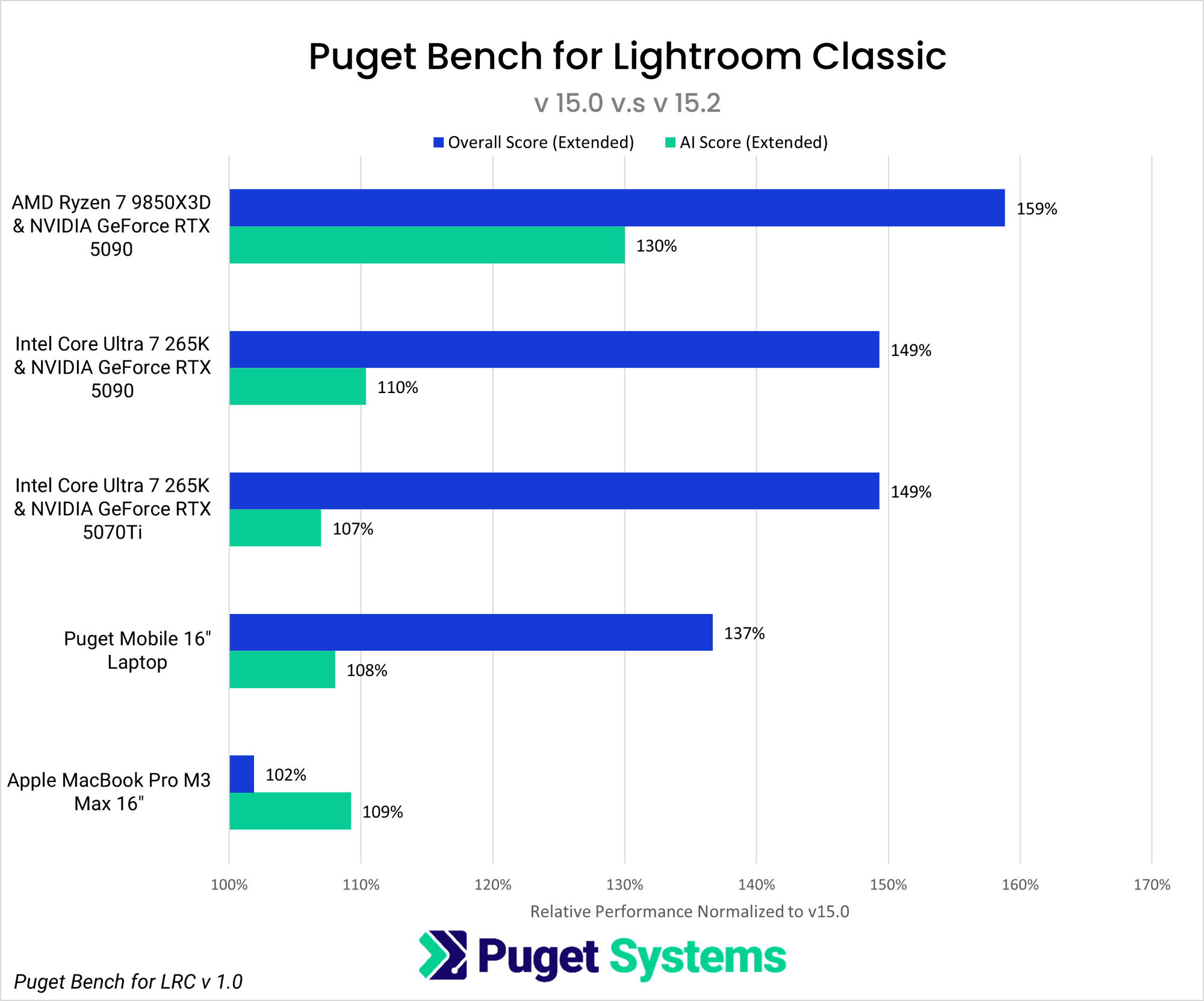
Upgrading to Lightroom Classic version 15.2 resulted in approximately a 59% performance boost on the AMD Ryzen™ 7 9850X3D platform and a 49% improvement on Intel Core™ Ultra 7 265K systems. Our Puget Mobile 16” laptop with an Intel Core™ Ultra 9 275 HX and NVIDIA GeForce RTX™ 5090 Mobile GPU achieved a 37% performance increase. In contrast, the Apple MacBook with a 16-core M3 Max processor experienced a minor 2% change. The AI features, primarily GPU-processed, also saw gains across all systems.
The