

Introduction:
DocuSign has been integrated with Salesforce to create, send, and track agreements or documents for signature, using static and dynamic data from Salesforce CRM. Let’s explore how to connect the Salesforce field with our document.
Check the initial steps for setting up DocuSign in Salesforce.
DocuSign Merge Field
Merge fields are DocuSign custom tags linked with Salesforce objects, which can be either custom or standard. When a custom tag with merge field settings is added to a document, data from Salesforce is imported into the tag. Merge fields can update Salesforce data if the signer changes the information.
New Template with Merge Field
We will use the Opportunity object:
- Create a template using Opportunity as the primary object.
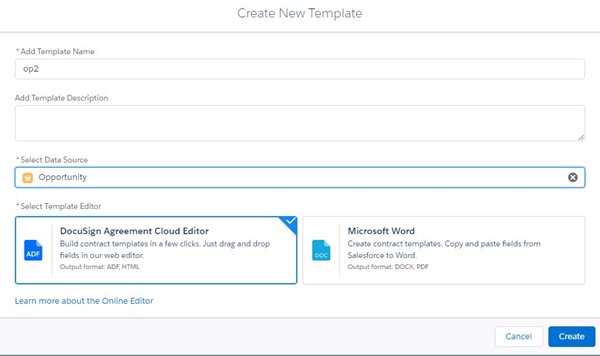
- Select Salesforce Fields
- Select OpportunityLineItems
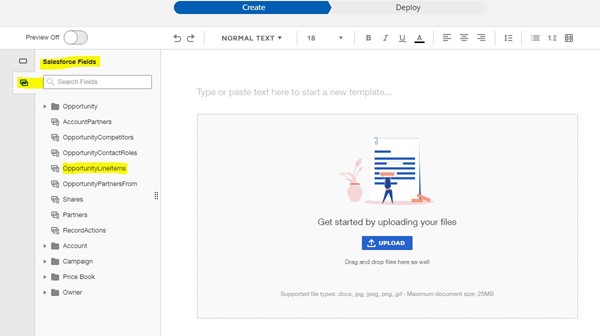
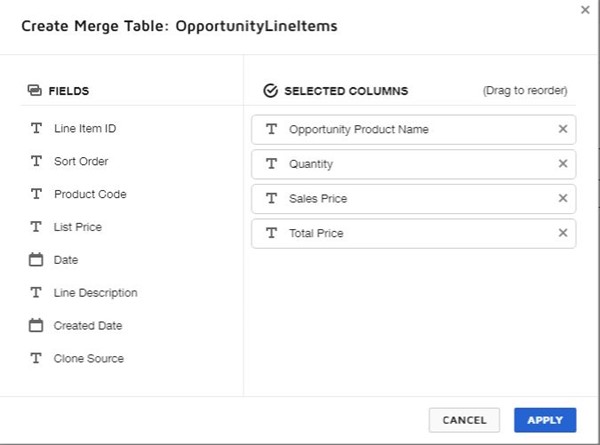
- Select fields to merge into the document; a table is auto-created.
We used the following fields:
- Opportunity product name
- Sales price
- Total price
- The table is auto-created.
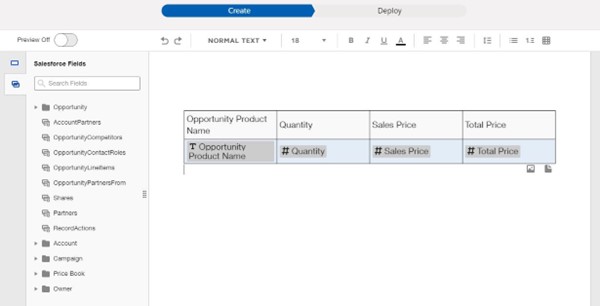
Once these merge field changes are completed, Quick Send and Write Back can be executed. Configuration is optional.
Why Quick Send and Write