

Hello — I’m Abishek Jakhar, a Senior Software Engineer at Coinbase, and I run FrontPrep, a product helping candidates prepare for frontend engineer interviews. My experience includes interviewing at Coinbase and Expedia, and I’m a top mentor on MentorCruise, guiding engineers in job hunting, interview prep, conducting mock interviews, and skill development.
Frontend interviews often involve rounds like:
1. **User Interface** – Building a user interface from an image.
2. **JavaScript Coding** – Writing functions like debounce or custom libraries.
3. **System Design** – Designing an app from scratch, considering libraries, performance, and component architecture.
4. **MCQ** – Technical multiple-choice questions in phone screens.
5. **AI Proficiency** – Using AI to enhance productivity.
Today, I’ll help you with a frontend question from Atlassian called Bar Chart. I will clarify the prompt, requirements, and solution, discussing how interviewers evaluate your work and common mistakes candidates make.
A crucial overlooked aspect in frontend interviews is discussing your approach with the interviewer before coding. Explaining your thought process is crucial as it mirrors real-world engineering tasks like discussing architecture and code.
You don’t need to explain every line, but communicate significant decisions. Examples include:
– Using `useEffect` with an empty dependency array for mount-only effects.
– Consolidating logic into a custom hook for cleanliness and reusability.
– Applying `box-sizing: border-box` for accurate component width.
Being vocal in interviews demonstrates communication skills and opens you to feedback, distinguishing you from entry-level candidates. It can also prompt interviewer guidance, showing that you care about planning and edge cases.
While some use AI for cheating, it highlights a lack of understanding unless concepts are clear. Thus, explaining code is a differentiator. I ask concept-related questions in interviews to ensure candidates understand their solutions.
Here’s how you’d approach the Bar Chart task at Atlassian:
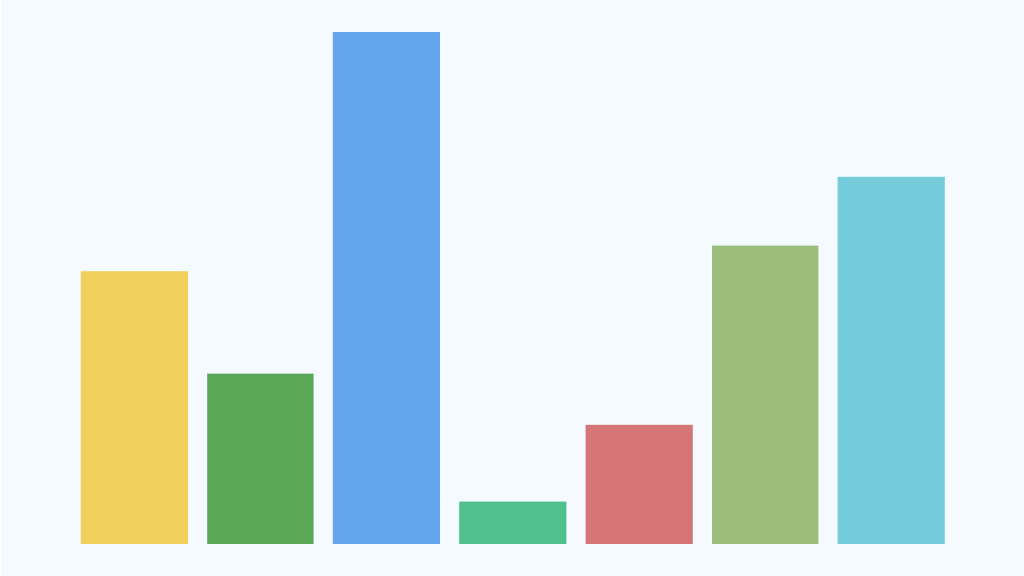
**Prompt:** Create a Bar Chart component in React to display a vertical bar chart using structured data. Use a predefined color for each bar.
**Example Code:**
**App.js:**
“`javascript
import React from ‘react’;
import ‘./style.css’;
export default function App() {
const [chartData, setChartData] = React.useState([]);
// Fetch data, set state
React.useEffect(() => {
getData()
.then(data => setChartData(data))
.catch(() => {});
}, []);
return (
);
}
“`
**BarChart Component:**
“`javascript
import React from ‘react’;
const getBarHeight = (height, maxHeight) => `${(height / maxHeight) * 100}%`;
function Bar({ …delegated }) {
return
}
export default function BarChart({ items }) {
const maxHeight = Math.max(…items.map(item => item.ticketCount));
return (
))}
);
}
“`
**Styling (style.css):**
“`css
*,
*::before,
*::after {
box-sizing: border-box;
}
body {
margin: 0;
width: 100%;
}
.wrapper {
padding: 40px 12px;
display: flex;
justify-content: center;
}
.chart {
height: 400px;
width: 500px;
background: transparent;
display: flex;
align-items: flex-end;
flex-direction: row;
gap: 12px;
}
.bar {
flex: 1;
border-radius: 4px 4px 0 0;
}
“`
Handling loading and error states shows seniority:
“`javascript
const [status, setStatus] = React.useState(‘idle’);
…
setStatus(‘loading’);
getData()
.then(data => {
setChartData(data);
setStatus(‘success’);
})
.catch(() => setStatus(‘error’));
…
return (
{status === ‘loading’ &&
Loading…
}
{status === ‘error’ &&
Something went wrong!
}
{status === ‘success’ && }
);
“`
The interview prioritizes communication and reasoning, so articulate your decisions clearly.
Interviews judge your solution on:
– **HTML/CSS**
– **JavaScript**
– **React**
Interviews of