
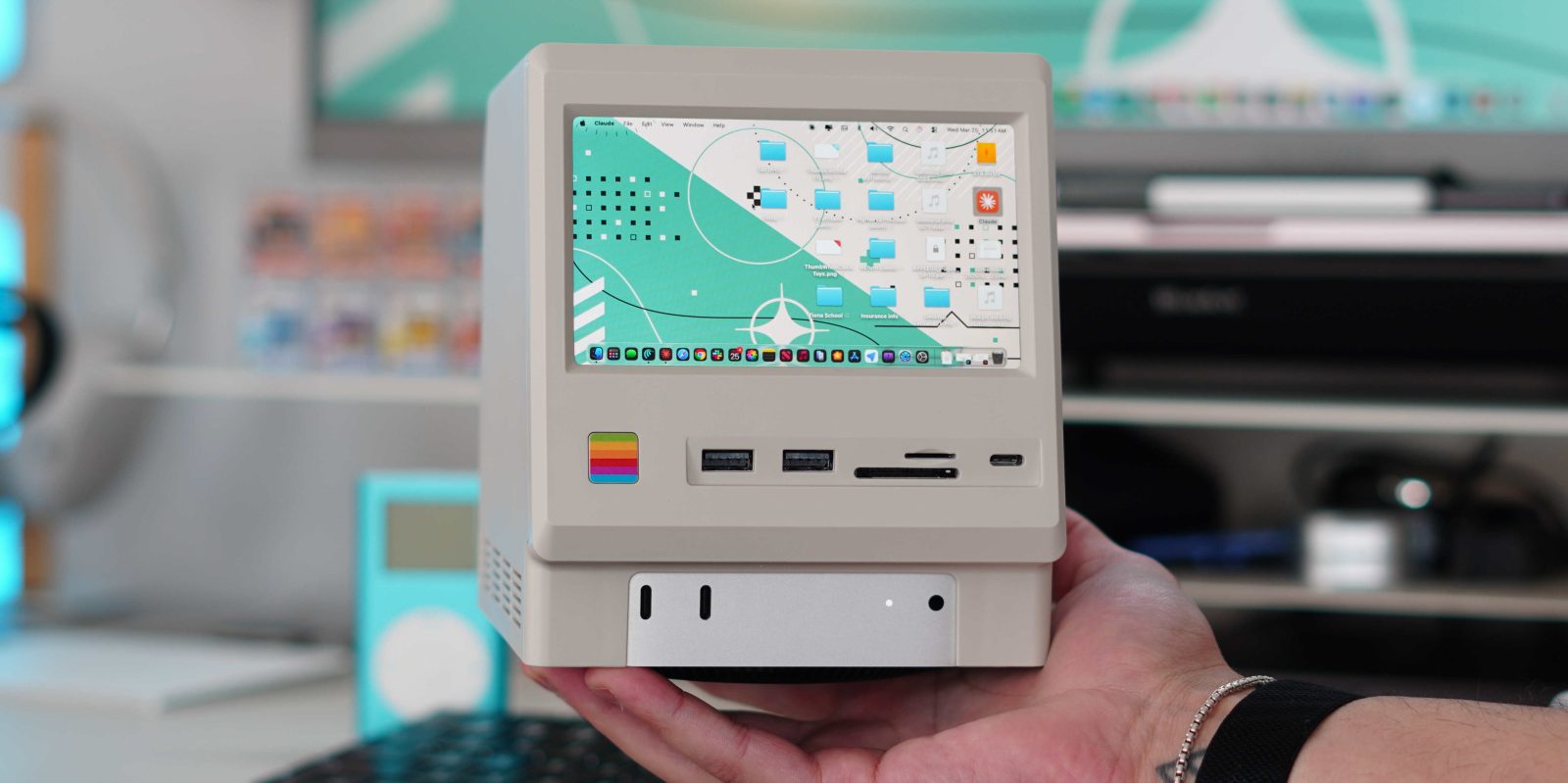

### Wokyis Retro-Docking Station: An Elegant Solution for Mac Mini Enthusiasts
In the world of docking stations and USB-C hubs tailored for the Mac mini, many choices exist, yet few rival the Wokyis Retro-Docking Station. Drawing inspiration from the timeless Macintosh design, this docking station not only boosts the functionality of your Mac mini by introducing a range of ports but also incorporates a built-in display that integrates flawlessly with the device. After checking out its Kickstarter prototype, I was keen to delve into the officially launched models, which include an enhanced 80Gbps option.
#### Main Features and Specs
The Wokyis Retro-Docking Station comes in two variants, each providing a distinct assortment of ports. Both models comprise:
– **4x USB-A (USB 3.2 Gen 2, 10Gbps)**
– **2x USB-C (USB 3.2 Gen 2, 10Gbps)**
– **SD and microSD card slots (UHS-II)**
– **M.2 NVMe SSD slot (up to 8TB)**
– **Headphone jack**
– **5-inch IPS 720P display**
The key difference between the two models is their video output options and SSD performance. The 10Gbps version contains an HDMI port for video output at 10Gbps, while the 80Gbps version switches HDMI for a DisplayPort, facilitating 8K video at 60Hz and quicker SSD speeds.
Both versions retain the same design, fitting neatly atop the M4 Mac mini. They feature a physical power button and brightness controls while ensuring access to all original Mac mini ports.
#### Compatibility
Although designed to complement the M4 Mac mini, the Wokyis dock is adaptable enough to function with any computer. It comes with a bottom cover, enabling it to serve as a standalone display dock for devices such as MacBooks, Mac Studios, or even iMacs. Its stylish look and extensive port options make it a fantastic addition to any desk arrangement.
#### Personal Experience
I utilized the Wokyis dock in two separate contexts. First, I employed it as a standalone dock for my MacBook Pro. Located next to my primary display, it granted me convenient access to extra ports and a small display for passive information, such as CPU diagnostics or video podcasts. Even with its 720p resolution, the display remained crisp due to its small size, proving to be a valuable asset to my workspace.
In a more recent setup, I transformed my M4 Mac mini into an AI workstation with the Wokyis dock. By connecting my SD card and transferring files to the NVMe SSD, I utilized AI tools to efficiently manage my video and audio files. The retro design of the dock injected a unique charm into my workspace, evoking 1980s Macintosh vibes.
#### Pricing and Availability
The Wokyis Retro-Docking Station is purchasable on Amazon and the Wokyis site. The 10Gbps model costs $169, with a $17 discount available on Amazon, bringing the price down to $153. The 80Gbps variant is listed at $339, with a $34 discount lowering it to $305. Both models come with essential accessories, including a USB-C host cable, a small screwdriver, and adhesive thermal tape, though an SSD needs to be bought separately.
#### Concluding Thoughts
In a landscape filled with similar USB-C and Thunderbolt hubs, the Wokyis Retro-Docking Station differentiates itself with its distinctive design and enhanced features. Its adaptability enables it to fulfill multiple roles, from a standalone dock to an AI workstation. As a nostalgic tech piece, it not only elevates functionality but also infuses character into any setup. There is a desire for a version compatible with the Mac Studio, thereby broadening its appeal even more.