
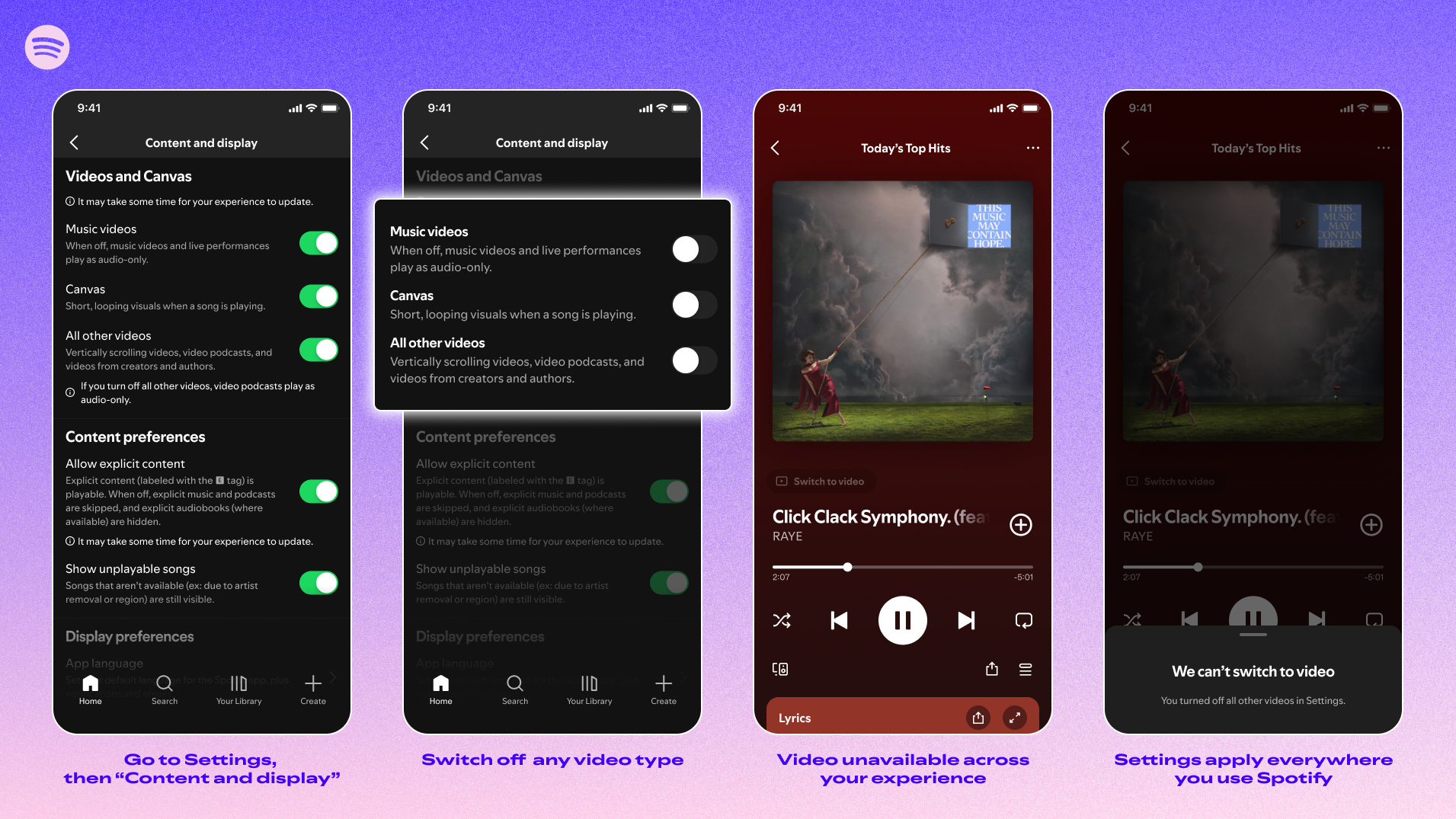

Spotify announced on Thursday the introduction of new controls for users to disable all videos in the app. These controls allow an audio-first or video-enhanced experience. Starting today, Family Plan managers globally can toggle video content on or off for any member through subscription settings, a feature previously limited to accounts for those under 13. Spotify reports 60% of those users had video disabled by account managers. Premium and Basic users in Individual, Duo, Family, and Student plans, as well as free service users, will also have control over video content in their app.
To access these video controls, users need to go to settings and select “Content and display.” From there, users can toggle “Canvas” looping visuals or videos for music or podcasts on or off. Preferences will be applied across mobile, desktop, web, and TV. This setting update will roll out globally this month. Spotify highlighted in a blog post that listeners can choose how they interact with videos amplifying music, podcasts, and audiobooks, noting it changes how time is perceived. However, video ads and Canvas-like visuals on some audio ads will still appear.
Spotify has focused more on video content in recent years, launching Canvas videos in 2018, video podcasts in 2020, and music video support in 2024 to compete with YouTube. By allowing users to turn off videos, Spotify aims to satisfy regulators and lawmakers scrutinizing the effects of social and video apps on younger audiences, while also catering to users who prefer a music-focused app.