
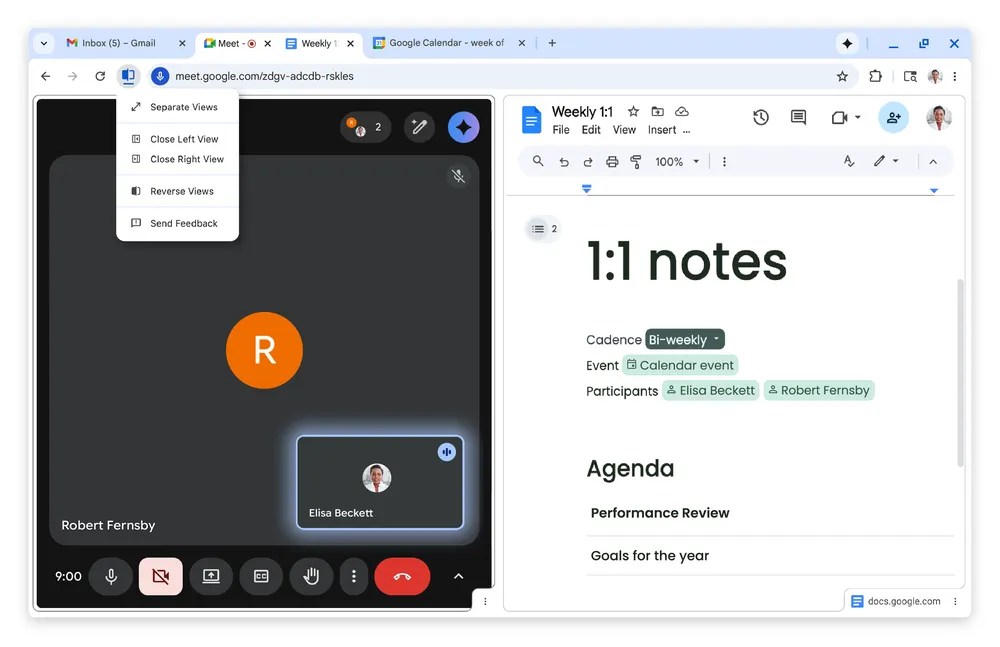

As AI companies and startups enter the web browser market, Google Chrome, the world’s biggest browser, is introducing new features. Google announced the release of Split View, PDF annotations, and a “Save to Google Drive” feature to further integrate Chrome with Google’s services.
While these features aren’t AI-focused, Google previously integrated its Gemini AI assistant into Chrome to counter increased competition from AI providers like OpenAI and Perplexity. These innovations have driven Google to enhance its development of consumer-facing features.
Split View simplifies multitasking by placing two pages side-by-side in one tab. This enables work across two webpages or watching a video while taking notes. To activate it, drag a tab to the browser’s edge or right-click a link and select “Open Link in Split View.”
The PDF annotations feature lets users add notes or highlight text in the browser, eliminating the need to download a PDF and open it elsewhere. This update simplifies tasks like signing documents, filling forms, or making notes.
The new Save to Google Drive feature enables saving PDFs directly to Google Drive, making them easier to locate in a “Saved from Chrome” folder.
This update follows the expansion of Gemini and agentic features to Chromebook users. Chrome is also set to support vertical tabs, a feature introduced by competitors and now in development. This approach, along with other features, is intended to reduce users’ reasons to switch browsers.