Apple Maps Unveils New Functionality for Exploring Popular Locations

**Apple Maps Unveils Advertising and Recommended Locations Feature**

Apple has formally revealed that ads will be incorporated into Apple Maps commencing this summer in the United States and Canada. This initiative is part of a larger plan to boost the visibility of businesses via a new platform named Apple Business, which enables businesses to craft advertisements that appear within Maps.

### The Launch of Ads

As per Apple’s press release, advertisements will appear when users search for places in Apple Maps. These ads will be positioned at the forefront of search results according to relevance and will also prominently feature in a newly established Suggested Places section. This segment is intended to offer users recommendations based on popular nearby locations, recent searches, and other criteria. Notably, Apple has stressed that advertisements will be distinctly labeled to ensure transparency for users.

### Recommended Places Feature

In conjunction with the launch of ads, Apple is also introducing the Suggested Places feature. This enhancement aims to streamline the process of finding new locations within the application. Although details regarding how suggestions will be generated remain under wraps, the feature is anticipated to improve user experience by delivering customized recommendations.

### Comparison with Rivals

The Suggested Places feature seems to be a reaction to comparable functionalities already present on platforms like Google Maps for several years. By leveraging real-time popularity data, Apple Maps aspires to foster a more engaging and user-friendly browsing experience.

### User Feedback

The unveiling of ads in Apple Maps has elicited mixed responses from users. Many value the prospective advantages of the Suggested Places feature, particularly for those navigating unfamiliar cities. Nonetheless, some users voice disappointment regarding the introduction of advertising, perceiving it as a potential detriment to the premium, uncluttered experience that Apple Maps has typically provided.

### Conclusion

As Apple Maps gears up to launch these new features, users are left to consider how the inclusion of ads will influence their overall experience. The challenge of balancing useful recommendations with a clean interface will be vital as Apple ventures into this new area. Users are invited to share their opinions on how these modifications may impact their selection of mapping applications.

How to Enhance Your New Mac: A Comprehensive Step-by-Step Manual

# Enhancing Your Mac Environment: Key Accessories for Boosted Efficiency

Improving and fine-tuning a Mac environment can greatly increase efficiency and productivity. Whether you’ve just received a new M4 MacBook Pro or are thinking about moving to an M5 MacBook Air or MacBook Neo, there are plenty of accessories that can enrich your experience. Below is a selected list of key accessories that can revamp your workspace.

## Table of Contents
1. [Logitech MX Master 4](#h-logitech-mx-master-4)
2. [Satechi Desk Mat](#h-satechi-desk-mat)
3. [OWC Thunderbolt 5 Dock](#h-owc-thunderbolt-5-dock)
4. [Satechi USB-C 165W Charger](#h-satechi-usb-c-165w-charger)
5. [Laptop Stands from Twelve South](#h-laptop-stands-from-twelve-south)
6. [Beats Pill](#h-beats-pill)
7. [iPhone Stand](#h-iphone-stand)
8. [Apple Magic Keyboard with Touch ID](#h-apple-magic-keyboard-with-touch-id)
9. [Apple Magic Trackpad](#h-apple-magic-trackpad)
10. [Satechi Headphone Stand](#h-satechi-headphone-stand)
11. [HomeKit Light Strips](#h-homekit-light-strips)
12. [Philips Hue Play Light Bar](#h-philips-hue-play-light-bar)
13. [HomeKit Desk Lamp](#h-homekit-desk-lamp)
14. [Under-desk Storage Shelf](#h-under-desk-storage-shelf)
15. [Cleaning Solutions](#h-cleaning-solutions)

## Logitech MX Master 4
The Logitech MX Master 4 represents an upgrade of the cherished MX Master line. It boasts enhanced build quality, haptic feedback, and a more resistant finish to stains. This mouse is perfect for enhancing productivity, featuring customizable buttons and effortless connectivity.

[Buy on Amazon](https://geni.us/eOqdGUp)

## Satechi Desk Mat
A chic desk mat can elevate the visual appeal of your workspace. The Satechi eco-leather desk mat is robust, adaptable, and available in various colors for $39.99. Its dual-sided design ensures a sleek appearance without branding.

[Buy on Satechi](https://geni.us/Hp5TfdA)

## OWC Thunderbolt 5 Dock
The OWC Thunderbolt 5 Dock streamlines connectivity through a single cable for connecting your display and peripherals. It offers several Thunderbolt 5 ports along with USB-A options, contributing to a neat desk arrangement.

[Explore OWC Thunderbolt 5 Hub](https://geni.us/iyTS)

## Satechi USB-C 165W Charger
Equipped with four USB-C ports, the Satechi USB-C 165W Charger facilitates fast charging for multiple devices at once. Its compact form factor makes it an indispensable complement to any desk.

[Buy on Satechi](https://geni.us/7m7unb)

## Laptop Stands from Twelve South
For enthusiasts of a clamshell configuration, the Twelve South BookArc supports your MacBook in an upright position, creating more desk space. Conversely, the Twelve South Curve is ideal for scenarios requiring the lid to be open, offering ergonomic advantages.

[Explore Twelve South BookArc](https://geni.us/jgu6i)

## Beats Pill
The Beats Pill is a compact speaker that merges aesthetics with audio performance. Offered in multiple colors, it is excellent for both workplace usage and portable listening.

## iPhone Stand
The Twelve South HiRise 3 Deluxe functions as an upright charger for your iPhone and provides additional wireless charging for AirPods, along with a built-in charging pad for Apple Watch.

[Buy on Twelve South](https://geni.us/AqA8o)

## Apple Magic Keyboard with Touch ID
The Apple Magic Keyboard with Touch ID provides seamless compatibility with your Mac, facilitating quick access and secure transactions. Its design ensures a consistent typing experience across different devices.

[Buy on Apple](https://geni.us/URhDW)

## Apple Magic Trackpad
The Apple Magic Trackpad pairs well with the MX Master mouse, offering gesture controls for tasks such as editing and navigating. This dual configuration boosts productivity for those spending extended hours at their workstations.

[Buy on Apple](https://geni.us/fuBey8)

## Satechi Headphone Stand
The Satechi 2-in-1 Headphone Stand not only accommodates your headphones but also includes a Qi charging pad for your iPhone or AirPods, plus USB-C ports for extra convenience.

[Buy on Satechi](https://geni.us/KkAHTc)

## HomeKit Light Strips
Home

Devices Compatible with External Hard Drives (Not Including Laptops)

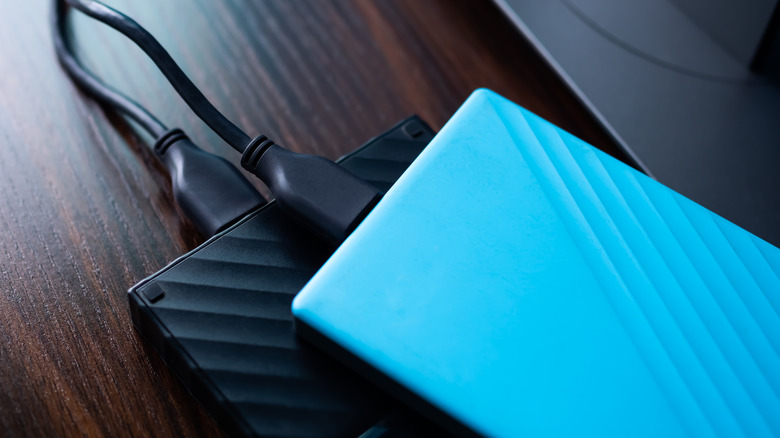
A lot of individuals depend on external hard drives for their storage requirements, frequently opting for them as a more affordable data storage solution. They are utilized with laptops and desktops for data backup or file transfers among devices. Nevertheless, computers are not the sole types of devices that accommodate external hard drives. Numerous contemporary gadgets can read or write information on these hard drives without any issues or use them to increase their total data capacity.

If you are aiming to maximize your external hard drive’s usage, here are some of the most prevalent gadgets — many of which you likely already possess at home — that are compatible with an external hard drive. It’s advisable to format the external hard drive in the exFAT file system before connecting it to a device that does not offer a complete desktop interface to enhance compatibility across devices and ease setup. Additionally, in certain instances, employing a powered USB hub may be necessary to provide adequate power to an external hard drive that comes without a power adapter.

Smart TVs