
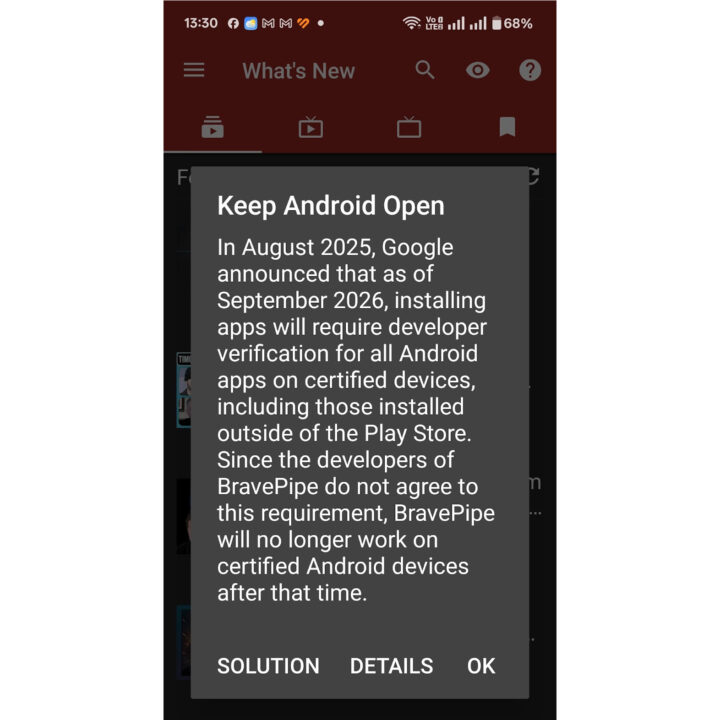

Starting September 2026, Google will make it more difficult to sideload apps using APK files on certified Android devices. It will still be possible, but will require “developer verification” and an “advanced flow” for power users.
This change came to my attention after a recent BravePipe (formerly BraveNewPipe) update, which included a pop-up titled “Keep Android Open” linking to a website for further information.
The “Keep Android Open” site outlines the requirements for installing and updating an app (APK) on certified devices:
– Paying a fee to Google
– Agreeing to Google’s Terms and Conditions
– Providing government identification
– Uploading evidence of the developer’s private signing key
– Listing all current and future application identifiers
I also came across an X post discussing the topic, which referenced a new post on the Android Developers Blog titled “Android developer verification: Balancing openness and choice with safety,” accompanied by a banner stating “sideloading is here to stay.”
Google offers three ways to sideload apps:
1. **Sideloading directly from verified developers:** Operates as it currently does, but developers must be verified, which might be problematic for some apps.
2. **Sideloading from developers with limited distribution accounts:** Users can sideload apps from developers they know through channels they choose. As explained by Google, they are developing free limited distribution accounts for students and hobbyists, allowing app sharing with small groups (up to 20 devices) without requiring government-issued ID or registration fee.
3. **Sideloading from unverified developers with advanced flow:** This might involve downloading an APK from platforms like GitHub.
The “Keep Android Open” site highlighted the first option. The third was previously common: downloading an APK, accepting the risks, and installing it. This poses a security issue, so Google created an “advanced flow”:
– Enable developer mode in system settings
– Confirm no coercion – ensuring the user isn’t being scammed into installing the app
– Restart your phone and reauthenticate – to disconnect any remote access or active calls used by scammers
– One-time, one-day wait – Users must wait 24 hours after restarting the phone, referred to as the “Security delay.”
– After the delay, confirm identity with biometric authentication or device PIN
– Install apps – Users can then install apps from unverified developers and enable this feature for 7 days or indefinitely.
While this is inconvenient, it allows users to sideload apps without fees and developers to maintain anonymity. Additionally, it may reduce scammer effectiveness.