

Introduction:
DocuSign has integrated with Salesforce to facilitate creating, sending, and tracking signature agreements or documents. This integration allows the inclusion of both static and dynamic data from Salesforce CRM. Let’s explore how to link Salesforce fields to your document.
Here, you can follow the initial steps to set up DocuSign in Salesforce
DocuSign Merge Field
Merge fields are custom DocuSign tags linked with Salesforce objects, whether custom or standard. When added to a document, the merge field tag imports Salesforce data. Merging fields also allows data updates in Salesforce if signers change the information.
New Template with Merge Field
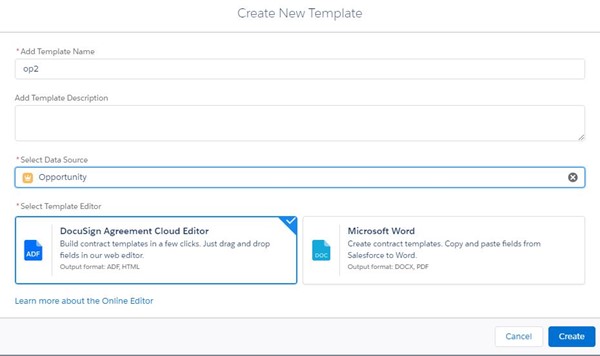
We’ll use the Opportunity object:
- Create a template using Opportunity as your primary object
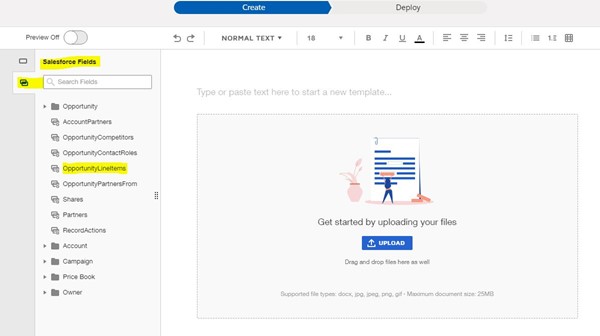
- Select Salesforce Fields
- Select OpportunityLineItems
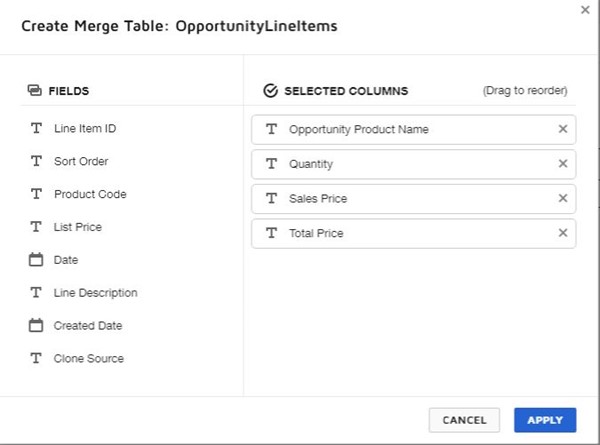
- Select the fields you wish to merge into your document; a table is automatically created
The fields used are:
- Opportunity product name
- Sales price
- Total price
- The table is automatically created.
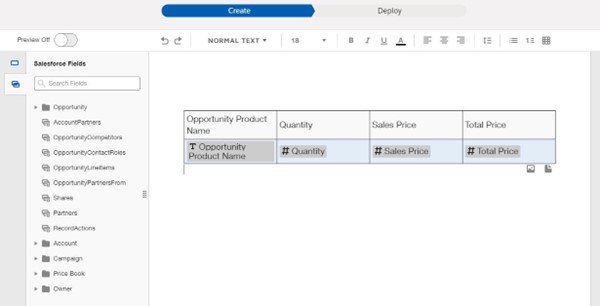
After making these merge field changes, you can perform a Quick send and write back, with additional configurations if necessary.
Why Quick Send and Write