

After concluding its protracted antitrust dispute over the Android app ecosystem earlier this month, Google announced on Thursday that it will simplify the process of installing Android apps from outside the Play Store. The company unveiled an “advanced flow” setting that permits Android users to disable a verification requirement, which typically blocks the sideloading of apps.
Last year, the tech giant declared it would mandate all Android apps to be registered by verified developers for installation on certified Android devices. This initiative aims to prevent malicious actors from distributing malware, conducting financial fraud, and stealing personal data through apps outside the Play Store.
While additional security measures can mitigate these risks, some Android users prefer the option to install unverified apps, accepting responsibility if those apps prove unsafe.
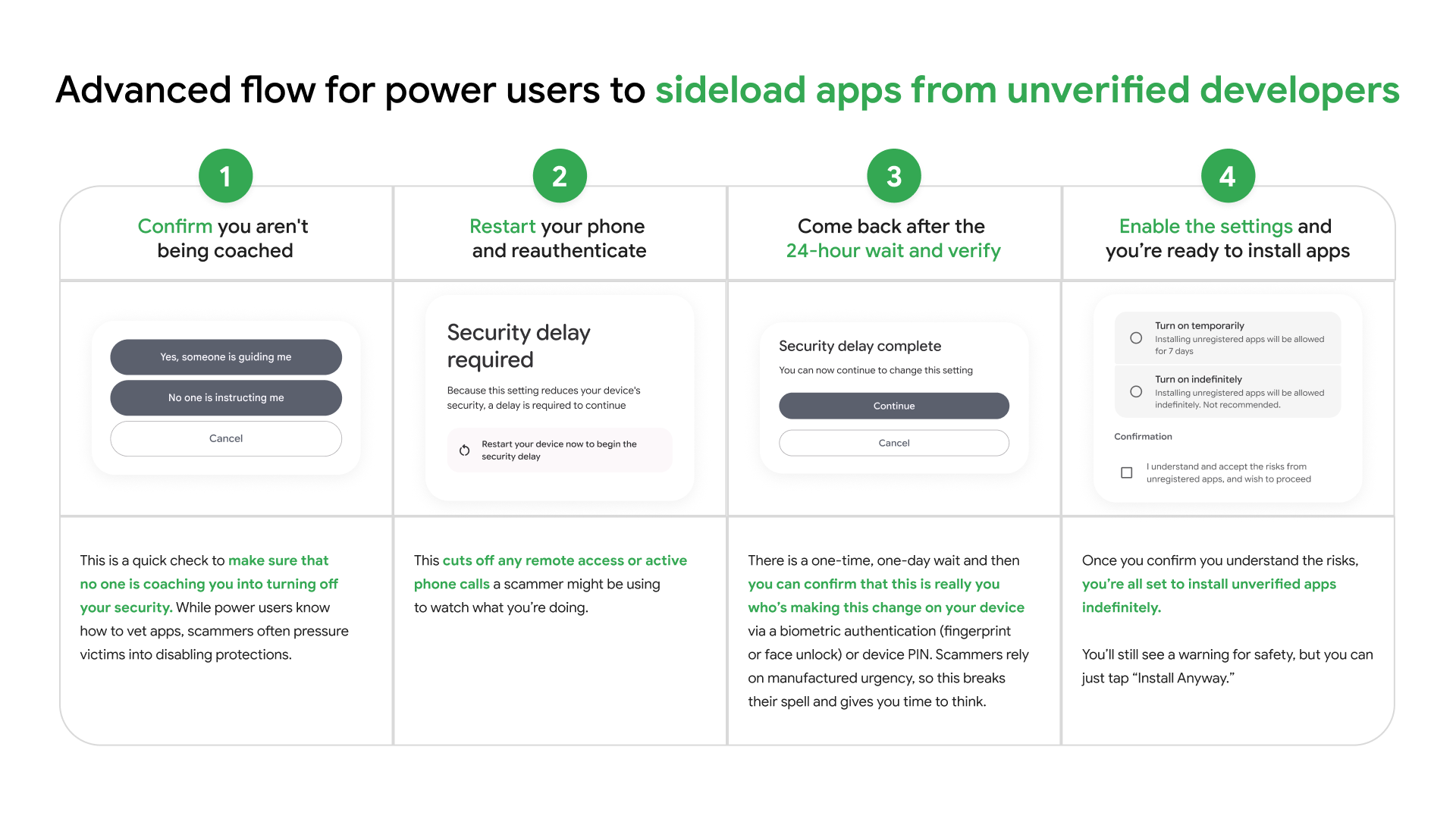
Through the “advanced flow” setting, users can undertake a one-time process to disable these extra protections while still combating scams.
The process starts by activating developer mode in Android’s system settings, safeguarding against accidental triggers or “one-tap” bypasses often utilized in high-pressure scams. Google notes that scammers frequently exploit fear to instill urgency in victims, using threats of financial ruin, legal trouble, or harm to a loved one. They may also remain on the phone with the victim, guiding them to disable security protections on their device.
A report by the Global Anti-Scam Alliance (GASA) indicated that 57% of adults globally encountered a scam in 2025, as cited by Google.
After enabling developer mode, a quick check ensures no one is coaching the user to disable security protections. Subsequently, users restart their phone and reauthenticate, a step that interrupts any remote access or active calls scammers might be using to monitor their victims.
Following a one-time, one-day waiting period, users can confirm the change is genuinely initiated by them. Given scammers often rely on manufactured urgency, this interval provides time for reflection, Google explains. Once the waiting period concludes, device owners can employ biometric authentication, like fingerprint or face unlock, or use their device PIN to confirm the change.
Upon completion of the process, Android users can install apps from unverified developers outside the Play Store. Users can opt to enable this for 7 days or indefinitely. While Google will still provide a warning about the app originating from an unverified developer for safety reasons, users can bypass this warning with a tap.
The company also announces free, limited distribution accounts for students and hobbyists wishing to share apps with up to 20 users without needing government ID and registration fee verification.
These changes follow the settlement of a protracted legal battle between Google and Fortnite creator Epic Games over Play Store anticompetitive issues. As a part of the settlement, Google will reduce Play Store commissions to 20% on in-app purchases, with an additional 5% if developers choose Google’s billing system.