A new line of high-end products could be on the way from Apple.


A new line of high-end products could be on the way from Apple.
Bluesky CEO Jay Graber announced she is stepping down from the role and taking on a new title at the alternative social media platform.

Take your online security more seriously with this three-year subscription to the Surfshark VPN Starter Plan, on sale now for $67.20 with code VPN20 through June 30.

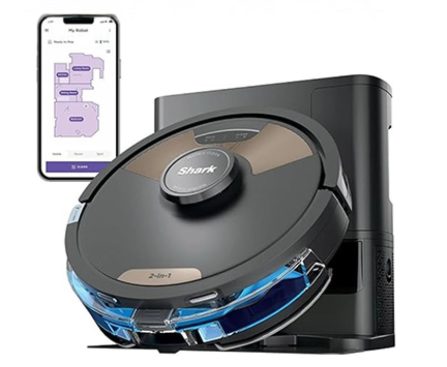
Tidy up without putting in the elbow grease thanks to this Shark Matrix Plus 2-in-1 Self-Empty Robot Vacuum and Mop, now only $134.99 (reg. $299.99)
‘Fatal Frame II: Crimson Butterfly REMAKE’ review for PlayStation 5

The Anker Solix F2000 portable power station is on sale at Amazon for $849, down from the list price of $1,999. That’s a 58% discount.

### macOS 26.4 Developer Beta 4: What’s New and How to Install
Apple has introduced the macOS 26.4 developer beta 4, offering users a preview of new features and enhancements ahead of the official rollout. This article highlights the main updates and the process for installing the latest beta version.
#### Key Features of macOS 26.4 Developer Beta 4
1. **Return of Compact Tabs in Safari**:
After eliminating the compact tab view in the previous macOS 26 version, Apple is reinstating it in macOS 26.4. This function facilitates a more efficient browsing experience, simplifying the management of multiple tabs.
2. **Fix for Window Resize Pointer Bug**:
The update resolves a previously noted issue where the cursor failed to align properly with the window’s corner shape during resizing. Although Apple had indicated this was resolved in macOS 26.3, it was subsequently reclassified as a known problem.
3. **Battery Charge Limit Feature**:
A new built-in option allows users to set a maximum battery charge limit ranging from 80% to 100%. This feature is designed to help prolong the overall health and lifespan of the Mac’s battery.
4. **Warnings for Rosetta 2 Applications**:
As part of Apple’s shift away from Rosetta 2, macOS 26.4 will start alerting users when they open applications that depend on this technology. This is part of a larger strategy to retire Rosetta 2 with the forthcoming macOS 27.
5. **Build Information**:
The release build for macOS 26.4 beta 4 is 25E5233c. Further investigation of the code may uncover additional features.
#### How to Install macOS 26.4 Developer Beta 4
To install the new beta version, follow these steps:
1. **Backup Your Mac**: Ensure all crucial data is secured.
2. **Open System Settings**: Go to your Mac’s System Settings.
3. **Go to General > Software Update**: Locate the Software Update section.
4. **Click the ‘i’ Icon Next to Beta Updates**: Access the beta updates menu.
5. **Select macOS Developer Tahoe Beta**: Choose this option from the dropdown menu.
6. **Hit ‘Done’**: Confirm your selection to initiate the update process.
#### Conclusion
macOS 26.4 developer beta 4 brings several significant features and fixes, enhancing the user experience and resolving prior issues. Users keen on trying the beta can follow the detailed steps for installation. As Apple works to refine its operating system, input from beta users will be essential in influencing the final version.
### New Emoji Arriving with iOS 26.4 Beta 4
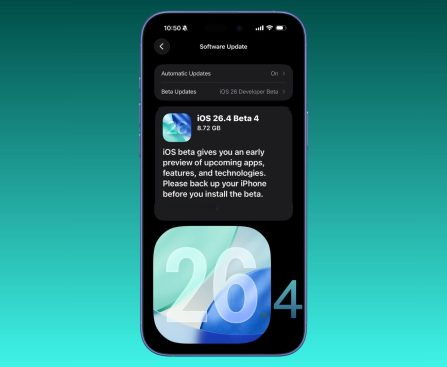
The release of iOS 26.4 beta 4 for developers brings a selection of new emoji for iPhone users. These updates enrich the emoji collection available on iOS devices, enabling more vibrant communication.
#### Summary of New Emoji
The Unicode Consortium, which oversees the approval process for new emoji, has officially included a new set of symbols for iOS 26.4. The following new emoji are now accessible in the beta version:
– **Ballet Dancers**
– **Distorted Face**
– **Fight Cloud**
– **Hairy Creature**
– **Landslide**
– **Orca**
– **Trombone**
– **Treasure Chest**
These emoji are important as they adhere to the cross-platform emoji standard, guaranteeing compatibility across various messaging services once iOS 26.4 officially launches.
#### Upcoming Emoji Prospects
In anticipation of the future, proposals for new emoji in iOS 27 have been suggested, though they await approval. Some of these prospective additions feature gestures like leftward and rightward thumb signs, a meteor, a squinting smiley face, and an eraser.
#### Final Thoughts
The rollout of new emoji in iOS 26.4 offers users exciting new ways to express themselves. As the beta progresses, user feedback will be vital in refining the final version.
### Fresh Wallpapers in macOS 26.4: A Preview of MacBook Neo
Apple has recently unveiled thrilling new features in macOS 26.4, which includes a collection of vibrant wallpapers that were initially introduced with the new MacBook Neo. Users no longer have to buy the $599 laptop to appreciate these breathtaking visuals, as the wallpapers are now accessible for all compatible Macs.
#### The Fresh Wallpapers
The update features four impressive wallpapers that embody the style of the MacBook Neo. These wallpapers consist of:
– **Mac Purple**
– **Mac Blue**
– **Mac Pink**
– **Mac Yellow**
These new additions can be conveniently found in the Pictures section of the Wallpaper settings on your Mac.
#### Update Overview
The macOS Tahoe update, which encompasses these wallpapers, is presently undergoing beta testing and is anticipated to be available by late March. In conjunction with the new wallpapers, the update will also introduce support for fresh emoji characters, enhancing the overall user experience.
#### How to Acquire the Wallpapers
For those who are not quite ready to update their macOS, the four MacBook Neo-specific wallpapers can be downloaded directly from various online platforms. This enables users to enjoy the new designs without awaiting the official update.
In conclusion, macOS 26.4 is poised to introduce a burst of color and new features to Mac users, creating an exciting period for Apple fans.

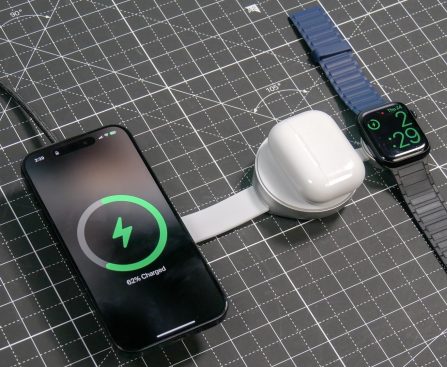
# LISEN Qi2 3-in-1 Charging Station: The Ultimate Charging Solution for Apple Devices
In today’s fast-paced environment, maintaining a tidy and efficient desk setup is crucial for productivity. For individuals who value simplicity, the LISEN Qi2 3-in-1 charging station stands out as an exceptional solution. With its compatibility with the Qi2 standard, it provides up to 15-watt fast charging and a design inspired by Apple, making it an ideal accessory for users deeply engaged with the MagSafe ecosystem.
## Build Quality
One of the first things that captivates about the LISEN Qi2 charger is its high-end build quality. The design showcases a stylish blend of silver and black, featuring a considerable amount of metal. This sharply contrasts with the plastic-only MagSafe chargers typically available on the market. The additional weight from the metal construction guarantees stability during one-handed use, which is a detail that enriches the overall user experience. Furthermore, the color scheme closely aligns with that of the MacBook Pro, establishing a harmonious aesthetic on your desk.
A notably considerate design aspect is the retractable Apple Watch charger. For users who either charge their watch solely at night or do not possess one, this retractable puck can be concealed, contributing to a tidier desk appearance. This meticulous attention to detail is especially valued by those who appreciate minimalism in their workspace.
## Versatile Usage
Although the primary role of the LISEN Qi2 is as a 3-in-1 charging station, it also functions effectively as a singular MagSafe stand. This versatility permits users to check notifications, receive two-factor authentication alerts, or even use their iPhone as a webcam during remote meetings. The magnetic grip is strong, ensuring that the phone stays securely positioned without the risk of dropping.
Additionally, the LISEN Qi2 charger is an outstanding travel companion. Its compact design allows it to fit effortlessly into a bag, and it includes a necessary USB-C cable and adapter in the package. This makes it a practical option for on-the-go charging requirements, whether in hotel rooms or shared workspaces. With Qi2 speed support, users can experience fast charging without the annoyance of slow power delivery.
## Conclusion
The LISEN Qi2 3-in-1 charging station is an impressive solution that simplifies desk organization while meeting various charging needs. Whether you need a speedy MagSafe dock for your iPhone 17 Pro or a comprehensive charging solution for your AirPods and Apple Watch, this device delivers efficiently without complications.
Its combination of functionality and refined design showcases that one charger can indeed fulfill all your needs. For those looking for a streamlined charging solution for their Apple devices, the LISEN Qi2 is a compelling choice worth exploring.
You can acquire the LISEN Qi2 3-in-1 Charging Station on [Amazon](https://amzn.to/4qOMUFp).