Blog Posts

Blog Posts

Disproving Popular Hard Drive Misconceptions: Essential Information You Should Have

Hard drives might actually be gaining value as the cost of NAND flash chips, which are utilized in SSDs and flash drives, soars due to overwhelming demand from AI firms. Thus, hard drives remain just as pertinent in computing hardware today as they were 10 or 20 years ago. They can still be repurposed for various tasks even after they are no longer your main or secondary storage solutions.

Nonetheless, like any widely-used technology product, hard drives are subjected to misconceptions that live on in popular culture and are frequently accepted as facts by less informed users. Beliefs such as magnets erasing a hard disk and the idea that formatting a disk can eliminate all remnants of data continue to resonate among users. Here are a few of these hard drive myths that have little to no factual support, and it’s time to stop endorsing them.


Magnets will destroy your hard drive

Apple Cautions That Well-Known MacBook Privacy Accessory May Harm Screens

One of the most popular third-party privacy accessories for MacBook users is camera covers. Although Apple maintains stringent privacy standards and robust security measures against hacking, some individuals choose to physically obstruct their webcams to ensure unauthorized access is deterred. This choice might stem from working in environments where information confidentiality is crucial or a desire to eliminate any risk of being recorded. Nonetheless, if you have a privacy cover on your MacBook’s webcam, it’s essential never to close the display while the cover is on, as this could lead to screen damage.

In a support document, Apple states: “Closing your Mac laptop with an installed camera cover may result in display damage due to the extremely tight tolerances between the display and keyboard.” Moreover, consistently using a physical accessory on your camera may obstruct essential display functionalities. Recent MacBook Pro and MacBook Air models include ambient light sensors that automatically regulate brightness and even adjust display color with True Tone technology. While these features are not available on the latest MacBook Neo, it’s still advisable to avoid covering your MacBook camera when closing the lid with the accessory in place.

Apple devices come equipped with camera and microphone indicators.

If you own an iPhone, iPad, or Mac, Apple notifies you whenever an app utilizes your camera or microphone. Historically, Mac computers had a physical green light indicating camera activation. However, with the introduction of macOS Monterey in late 2021, the company transitioned to a digital version of this indicator when either the camera or microphone is in use. The camera light remains green, while the microphone light now appears in orange. Users can review a log of when apps accessed their camera or microphone in the Control Center on their Mac.

The iPhone saw a similar development. In iOS 14, Apple first implemented these light indicators, and then with iOS 15 in 2021, the Control Center history was made available for the iPhone. Subsequently, Apple intensified its marketing of privacy as a fundamental aspect of its products, especially amid rising public awareness regarding tracking, app surveillance, and privacy issues. It was around this time that the company began to impose stricter limitations on app tracking and user profiling while enhancing user control over what data they wish to share with third-party applications.

If you genuinely require a webcam cover, keep the following in mind.

If your work environment legitimately necessitates covering your MacBook’s camera, Apple offers several guidelines to ensure that such an accessory does not damage your Mac display. According to the company, a camera cover should not exceed the thickness of a standard piece of printer paper, specifically 0.1 mm. Apple also recommends avoiding camera covers that leave sticky residue. If your camera cover exceeds the thickness of printer paper, Apple’s suggestion is to remove it prior to closing your MacBook Air or MacBook Pro.

Apple reminds Mac users that they hold full control over which applications can access their camera and microphone, as access is disabled by default. Starting with macOS Mojave, users must grant permission to an app before it can utilize the camera on the Mac. By navigating to System Settings, users can access Privacy & Security in the sidebar, then click the Camera toggle to view the list of apps that have requested camera access and decide whether to continue granting permission.

For instance, in Safari, you can access the browser’s settings, select Websites, and choose Camera to review which websites have requested access to that feature, allowing you to continue granting or revoking camera access as needed. Consequently, if you don’t require the additional security of a camera cover, you maintain control over which apps and websites can utilize your camera and microphone.

Consumer Reports’ Highest-Rated Desktop Computers of 2026

Desktop PCs present a chance for professional creatives and gamers to fully optimize setups to meet their performance demands, while average users can view a desktop PC as a means to spread out and work more comfortably. Numerous desktop PCs are designed to be as compact as possible, occupying even less space on a desk than a laptop might.

Of course, there are desktop PCs that should be avoided. For this reason, we have examined which models Consumer Reports has identified as the top desktop PCs available today. A variety of form factors exist, including desktop towers, all-in-one desktop solutions, and mini desktop PCs. We have assessed what each has to offer and how they performed in Consumer Reports’ evaluations. This results in a selection of choices for those seeking not only the optimal desktop PC for their requirements but also one they can rely on after purchase. Well-known computer brands like Apple and HP feature models that are considered among the finest, yet some lesser-known desktop PCs have shown themselves to be worthy options as well.

HP EliteStudio All-in-One 27-inch

The HP EliteStudio All-in-One is a desktop PC designed with productivity in mind. Consumer Reports regards it as the leading all-in-one PC currently on the market. The newest model is the HP EliteStudio 8 G1i, which can be tailored through a broad range of configurations. HP is focusing on, in

How Speakers Generate Various Sounds at the Same Time

your preferred Bluetooth speaker from a prominent brand on your desk can deliver the entire range of a 100-piece symphony for your auditory enjoyment, but how does one audio source faithfully reproduce 100 distinct instruments playing simultaneously? The solution resides in the principles of sound and speaker technology, and their capacity to combine numerous composite soundwaves into one, all-encompassing source.

Although you could theoretically employ a separate speaker for each individual instrument in that imagined symphony, the sound would not differ from having all those instruments transmitted through a single speaker. This is because, instead of projecting multiple individual waves into our ears, a speaker’s role is to identify the common point among various waves and amalgamate them into a cohesive sound that our ears can interpret. It may seem more intricate than it truly is, pun not intended. You simply need to grasp how sound travels, and how a speaker facilitates that movement.

Sound propagates in intricate, three-dimensional waves

Four Budget-Friendly Options to Integrated Monitor Speakers

affordable computer displays can still deliver high resolution and refresh rates for a sharp and clear screen. Nevertheless, one component of monitors that has not improved is the integrated speakers. Even premium monitors equipped with built-in speakers lack quality audio, and many have their speakers oriented downwards or backwards. This results in sound being scarcely audible, even at maximum volume.

Interestingly, the poor quality of monitor speakers is intentional. Manufacturers often utilize the same components across various products for cost-effectiveness, which is why computer monitors frequently share connection boards with televisions. Instead of eliminating the audio links for monitors, it’s actually more economical to incorporate small speakers rather than the more robust ones installed in televisions — although you may also consider enhancing your TV’s sound with a soundbar or additional speakers.

Fortunately, there are numerous straightforward and affordable alternatives that are significantly more effective, ensuring you don’t have to depend on your monitor’s unsatisfactory speakers ever again. Below are several options, highlighting specific speakers with excellent ratings and features, all priced under $150.

Headphones or earbuds

iPhone Costs in India Surpass Those in the U.S.

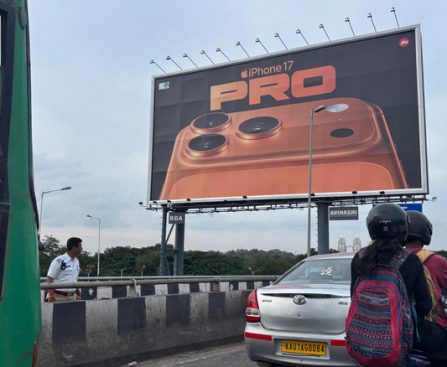
T-Mobile conducts promotions that provide subscribers with complimentary iPhone 17 models, naturally, under its terms and conditions. However, the iPhone is notably pricier overseas, with India being one of the nations where the iPhone 17 series costs significantly more than in the U.S.

Below are the iPhone 17 prices in India compared to the cost of the same models in the United States: 

  • iPhone 17: 82,900 INR ($876) vs. $799
  • iPhone Air: 119,900 INR ($1,267) vs. $999
  • iPhone 17 Pro: 134,900 INR ($1,426) vs. $1,099
  • iPhone 17 Pro Max: 149,900 INR ($1,584) vs. $1,199

There is a pricing note regarding the base iPhone. Apple provides a $30 connectivity discount on the standard iPhone 17 price in the U.S. This has been a longstanding practice for non-Pro models. Apple has maintained the $799 price point in previous years with this consideration. Purchasing an unlocked iPhone 17 from Apple without activating it with a carrier costs $829 instead of $799.

<div class="news-

Present Worth of Your Original NES Console

why the demise of ’80s arcades was gradual. Many years post-NES craze, enthusiasts continue to seek out the cherished console that kickstarted it all.

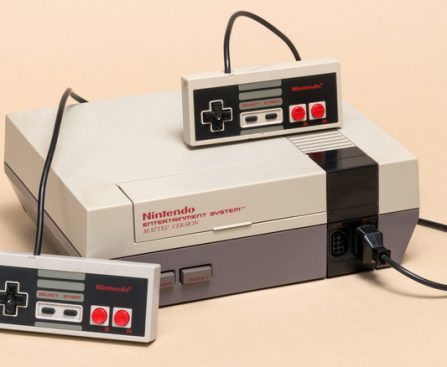
So, what is the current value of the original NES? A complete NES package with the original box and all its paperwork can fetch over $200 today. Even a standalone NES console without the box can still be sold for around $100, depending on its condition. If you’re fortunate enough to possess a brand new, sealed NES, that could be valued at nearly $1,000 or possibly more.

Some of the most unusual Nintendo creations were novelty peripherals for the NES, such as the Zapper light gun. This could be utilized with select games to aim and shoot at adversaries or objects shown on the screen. Another example is R.O.B., a toy robot that would react to on-screen action. If you have either of these add-ons, you can increase the console’s value by approximately $100 or $300, respectively.

Your original NES game cartridges also have significant value today

Amazon Customers Suggest These $17 Gloves as a Perfect Present for DIY Lovers

Good illumination is the fundamental aspect of any endeavor, as without light, visibility is non-existent. This applies to tasks like working within a vehicle chassis, using your hands, performing home repairs, or retrieving objects that have fallen behind the couch. You require light to see your tasks clearly. However, it isn’t always practical to hold a light source while working with both hands. Certainly, many smartphones come equipped with a flashlight, but positioning the phone to shine light where needed can be challenging. This is exactly why magnetic flashlights and headlamps were created. Another handy little $17 gadget from Amazon serves as a fantastic alternative.

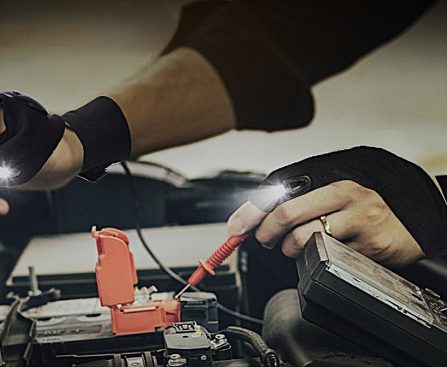
The Parigo LED flashlight gloves feature bright lights on both the index finger and thumb of each glove, totaling four lights. They allow your hands to remain free in dim or low-light environments while providing easily directed illumination to see your work clearly. Parigo touts them as “ideal” for cycling, outdoor activities, and fishing. They would also be excellent for tasks around your PC, nighttime reading, quick perimeter checks after dark, dog walking, and more. The LEDs are powered by replaceable CR2016 batteries, making it simple to change them out or carry extras. The gloves are designed to fit most sizes, are breathable, and waterproof, with a fully adjustable strap for a snug fit. One reviewer describes them as a “useful and fun gift,” suggesting they could be perfect for an Easter basket for the DIY enthusiast in your life. Naturally, there’s a mix of Amazon gadgets to buy and those to avoid, and the best method to determine where these gloves stand is to consult user reviews.

What are reviewers saying about the Parigo LED gloves?

As you likely know, the most reliable way to gauge whether a product is well-received and ascertain if others have found it beneficial or justifiable in price is to examine user feedback and reviews. These Parigo gloves currently boast over 10,000 reviews on Amazon, nearly 11,000 to be precise, with an overall rating of 4.5 out of 5 stars. Quite impressive, but do users actually have positive feedback about them? That certainly appears to be the case. Many commend the gloves for their “high quality” or exceptional fit. One reviewer simply notes that the gloves perform “as advertised,” while further emphasizing they are quite cool lights that provide substantial brightness, and the gloves fit well and are “very useful.”

However, not all comments are favorable. A few reviewers mention issues they encountered. More than one describes the gloves as “unimpressive,” stating they did not function or arrived with depleted batteries, failing to illuminate even after battery replacement. Another reviewer expresses that the integrated LEDs emit so little light during work that they are “ineffective.” The common theme seems to be problems with batteries or internal components, particularly with the lighting. At $17, it might be worthwhile to see what transpires. Furthermore, Amazon does provide a free 30-day refund or replacement policy for these, as mentioned in the product description.

If these aren’t to your liking or you require alternative gift suggestions, there are several Amazon gadgets priced under $75 that users recommend. If you prefer to keep the price even lower, there are numerous Amazon gadgets available for under $10 that perform effectively as well.

Reasons to Think About Buying the M5 MacBook Pro Now Even with an Imminent Redesign

### The Present Condition of the 14-inch MacBook Pro: A Buyer’s Perspective

The 14-inch MacBook Pro design has existed for almost five years, and Apple is allegedly developing a redesign for its MacBook Pro series. Even with the heightened expectations for new models, there is still a compelling argument for acquiring the existing base model MacBook Pro with the M5 chip.

#### Reasons to Purchase the Base Model M5 MacBook Pro Now

When talking about the M5 MacBook Pro, it’s important to specify that this refers solely to the base model, not the upper-tier M5 Pro or M5 Max variants. For those who do not need high-performance computing right away, it may be wise to wait for the redesign. However, if the base model is within your financial reach, it might be the optimal choice currently, given that the forthcoming redesign may not appeal to budget-oriented shoppers.

#### Redesign Limitation: M6 Pro and M6 Max

Current details indicate that Apple will introduce its MacBook Pro redesign exclusively for the more advanced M6 Pro and M6 Max models. There are no intentions to create a redesigned base model M6, which implies that if you have been postponing your purchase with the hope of a redesign, it may be time to think again. Historically, Apple tends to unveil new designs primarily for its higher-end models first, as demonstrated with the M1 Pro and M1 Max chips in 2021.

If your budget is beneath $2000, postponing for the redesign may not be wise, particularly considering potential price hikes due to supply chain issues.

#### Anticipations for the Upcoming Redesign

The expected redesign is projected to include an OLED display, a sleeker design, touch capabilities, and perhaps 5G cellular technology. However, these features are likely to be accompanied by a higher price tag, making them less attainable for a wide range of consumers. The timeline for a redesign of the base model could reach as far as 2028, in line with Apple’s historical trends.

#### Conclusion: The Worth of the Current M5 MacBook Pro

For individuals seeking to buy a MacBook Pro without exceeding $2000, the present M5 MacBook Pro offers exceptional value. With recent promotions providing discounts of $150-200 and an upgrade in base storage to 1TB, it remains a compelling option for users desiring enhanced performance and display quality without the elevated price of higher-end variants.

In conclusion, if you are considering a MacBook Pro and your financial situation aligns with the current options, the M5 model is likely your best bet for the near future.