
Practical Use of Form-Associated Custom Elements

Practical Use of Form-Associated Custom Elements

3 Min Read

I was more than three-quarters through rewriting the AgnosticUI components in Lit when I realized I had overlooked something crucial. My seemed solid and fired events correctly, but it lacked Form-Associated Custom Element (FACE) support, making it invisible to native submissions.

I became aware of this during a chat with my friend Marc van Neerven. We were discussing Web Components and Shadow DOM when Marc highlighted the importance of form association.

Motivated by the slight embarrassment of missing something fundamental, I began reading materials on ElementInternals and Form-Associated Custom Elements to understand how it worked. I knew native HTML form controls had built-in submission logic and FormData support, but was unaware of a FACE API.

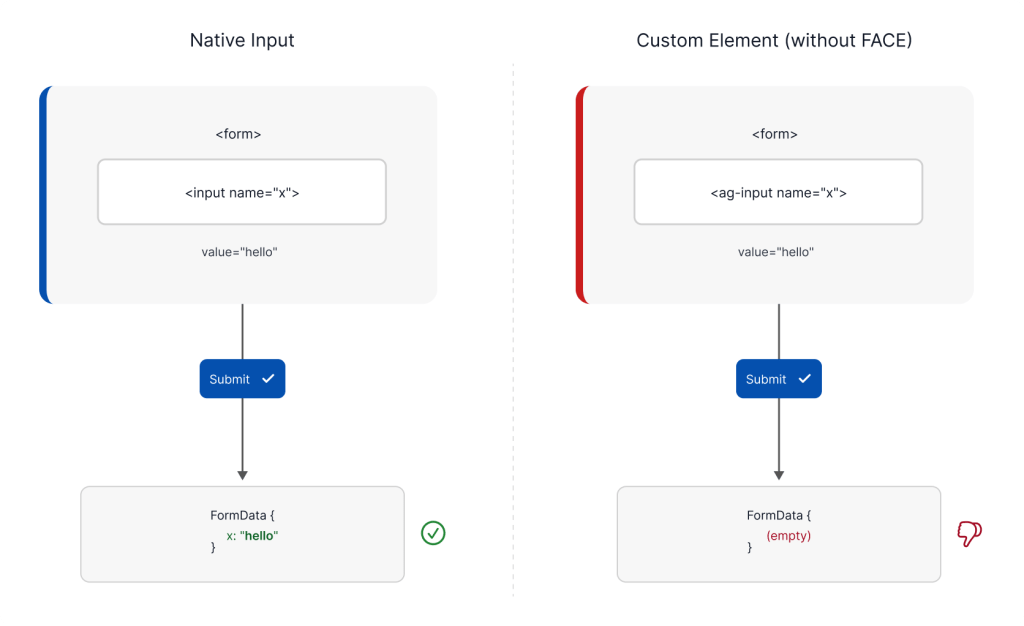
It’s frustrating to think you’re done with a dozen form components only to find they don’t support basic form functionality. Wrapping a naive custom element in a and submitting it makes the browser unaware of the component. Setting a breakpoint on your submit handler reveals an empty FormData object.

That empty object is what the server receives. Moreover, calling form.reset() leaves custom fields filled, and a

wrapper is ignored.

Fixing this involved retrofitting each form component in AgnosticUI. It was a huge task but led me to create a single, reusable Lit mixin, encapsulating the boilerplate in one place, keeping the code DRY, and ensuring form-awareness for my components.

Here’s what I discovered in the process.

## What FACE Actually Is

Enabling FACE begins with a simple bit of boilerplate. You tell the browser your element wants to participate in forms and then grab the ElementInternals API.

“`javascript
class MyInput extends HTMLElement {
static formAssociated = true;

constructor() {
super();

this._internals = this.attachInternals();
}
}
“`

While this opens the API, the real work involves ElementInternals. This is your agreement with the browser’s form system. It’s a suite of methods and properties that let your component interact with the parent .

Through _internals, you can:

– **Submit a value:** Use setFormValue() so your element appears in FormData.
– **Report validity:** Use setValidity() to work with form.checkValidity() and trigger native browser validation UI.
– **Manage state:** Use the .states property to toggle custom pseudo-classes like :state(checked), which aids styling.
– **Access metadata:** Read properties like .form, .willValidate, or .validationMessage from the instance.

On the flip side, the browser expects you to handle lifecycle callbacks. It calls formResetCallback when the form clears, formDisabledCallback when a

ancestor changes, and formStateRestoreCallback during form autofill after navigation.

There’s a lot to manage. As of early 2026, browser support is widely available (Chromium, Firefox, and Safari 16.4+), so we can use this without a complex polyfill.

## Sharing the Boilerplate: The Case for a Mixin

The first decision in deploying FACE across many components is where to place the shared code. The boilerplate is identical every time: you need the static flag, the attachInternals() call, and six getters to proxy internal state.

To keep things DRY, a base class like AgFormControl extends LitElement seems obvious. But JavaScript only supports single inheritance, so if a component needs to extend something else, you’re stuck.

### The Lit Mixin Pattern

We used a Lit Mixin. It lets us “plug in” form capabilities to any component while keeping the code DRY. To satisfy TypeScript with protected members, we use a companion declare class: it tells the compiler what the mixin adds to the class.

“`typescript
export declare class FaceMixinInterface {
static readonly formAssociated: boolean;
protected _internals: ElementInternals;
name: string;
readonly form: HTMLFormElement | null;
readonly validity: ValidityState;
readonly validationMessage: string;
readonly willValidate: boolean;
checkValidity(): boolean;
reportValidity(): boolean;
formDisabledCallback(disabled: boolean): void;
form

You might also like