
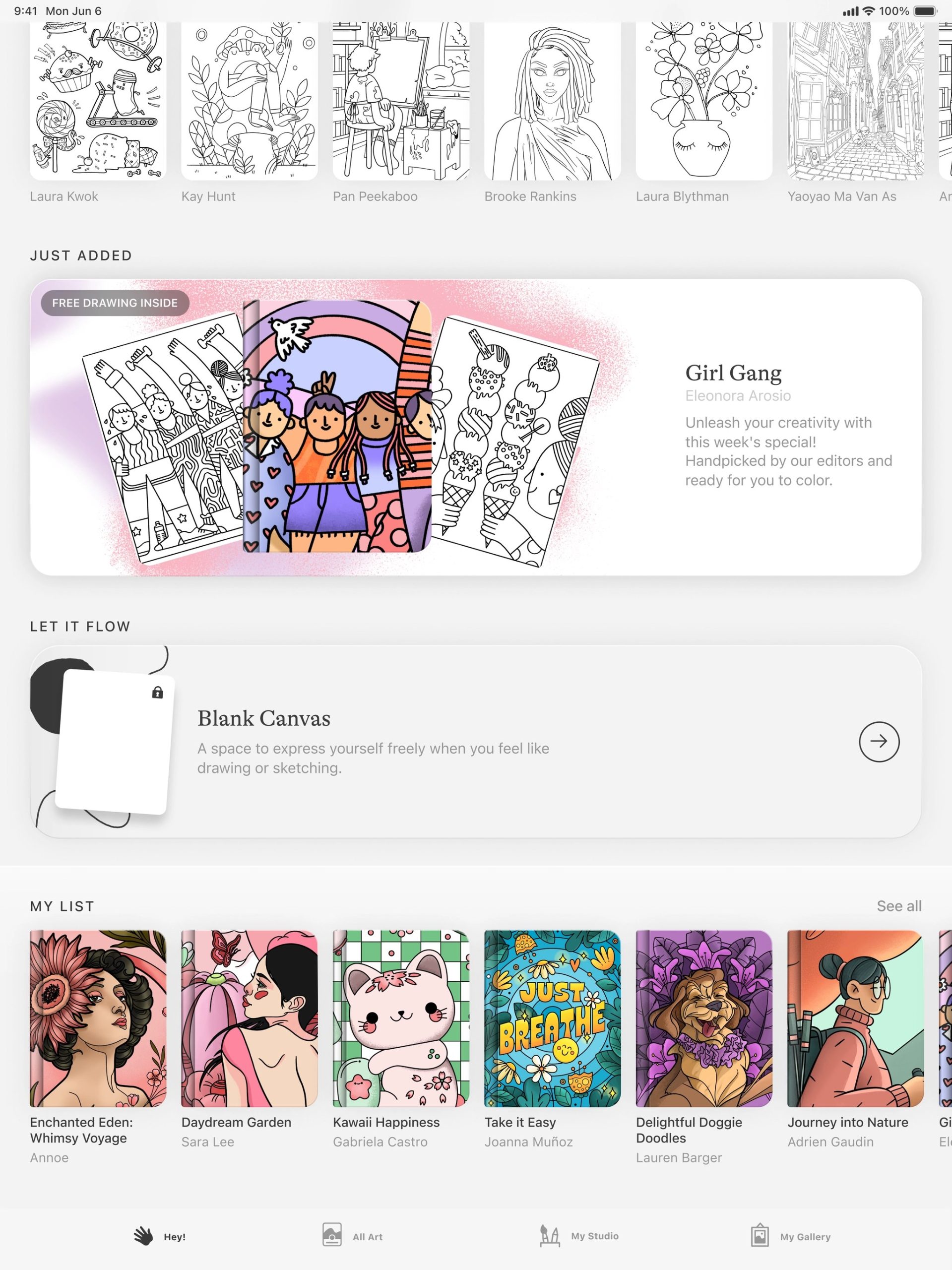

If you’re aiming to tap into your creativity, there are various iPad apps to kickstart your journey. Initially launched as a portable device for content streaming and web browsing, Apple’s iPad has evolved into a robust tool for digital art creation and video editing.
We’ve gathered some of the top iPad apps for creativity found on the App Store.
Before we begin, it’s important to mention that Adobe’s creative apps are excluded from this list, as they are already widely recognized. Instead, we’re highlighting relatively lesser-known apps worth exploring.
Lake
Not all creative apps require you to start with a blank page. Lake offers a more relaxed experience, enabling you to digitally color illustrations by independent artists using over 700 colors and various brushes.
If you feel like experimenting, you can also color and draw on an empty canvas and pen down your thoughts in a coloring journal.
The app caters to those new to creativity or seeking stress relief. Even if you’re not artistically inclined, Lake is forgiving if you stray outside the lines.
Free access is available for a limited selection of illustrations, with a full subscription costing $9.99 monthly.
Procreate
Procreate is among the most popular iPad drawing apps for a reason. It allows you to create digital paintings, sketches, and illustrations with a myriad of brushes. Procreate is user-friendly and includes gesture controls and a straightforward interface.
High-resolution canvases of up to 16K by 8K are supported on compatible iPad Pros. You can also create storyboards, GIFs, animatics, and simple animations. The app enables the import of image files like JPG, PNG, and TIFF. Features like QuickShape, StreamLine, Drawing Assist, and ColorDrop simplify creative tasks, freeing you to enjoy the process.
The app includes a “Replay” time-lapse feature to relive your creative process—a satisfying way to witness your art taking shape—and share it on social media.
Procreate is available for a one-time fee of $12.99.
LumaFusion
For those moving beyond iMovie, LumaFusion is an excellent choice for video editing, boasting intuitive features suitable for budding videographers or indie filmmakers on a budget.
LumaFusion supports multiple layer edits with 4K ProRes and HDR media. You can apply various effects, choose from numerous transitions, and record voice-overs. The app facilitates the creation of multilayer titles, import of fonts and graphics, and fine-tuning audio with Graphic EQ, Parametric EQ, and Voice Isolation.
LumaFusion supports projects in various aspect ratios, including 16:9 landscape, 9:16 portrait, square, widescreen film, anamorphic, and more.
The app requires a one-time payment of $29.99, with the option to buy additional features like multicam editing or exporting to Final Cut Pro for Mac.
Canva
Canva provides a user-friendly platform for creating visual content without graphic design skills. You can craft presentations, infographics, videos, websites, social media posts, and more using over 250,000 templates.
Canva includes photo editing tools, content personalizing options with logos, images, and audio, and capabilities for cropping and speeding up videos.
The platform offers AI features to simplify content creation, like “Magic Switch” for extending images and “Magic Media” for turning ideas into images.
Canva is free, with a $12.99 monthly subscription unlocking AI features, premium templates, and more.
Affinity Designer 2
Affinity Designer 2 is a graphic design app integrating vector design, pixel textures, and retouching into one platform. Ideal for professional illustrators, web designers, game developers, and other creatives.
The app supports creating illustrations, branding, logos, icons, UI/UX designs, typography, posters, labels, fliers, stickers, concept art, and more, with Apple Pencil support.
Affinity Designer 2 includes gesture controls for efficiency, customizable keyboard shortcuts, custom font creation, and over 1,000,000% zoom for precise detailing.
One-time payment of $18.49 grants access to the app.
Concepts
Concepts is great for developing ideas and design experimentation. It allows you to sketch plans, write notes and mindmaps, and create storyboards and designs.
The app includes Nudge, Slice, and Select tools for easy sketch adjustments without redrawing, and offers realistic pens, pencils, and brushes responsive to pressure and tilt.
Concepts provides scale and measurement tools for calculating real-world dimensions, and a personalizable tool wheel or bar.
The app’s basic features are free, with a $4.99 monthly subscription for additional features like custom brush creation and premium editing tools.
Tayasui Sketches
Tayasui Sketches is a user-friendly app for sketching and drawing, featuring tools like a realistic watercolor brush, digital acrylics, color blending, and gradient tools.
The app supports multitasking, enabling app overlays and