Astropad Introduces Workbench for Mac: A Remote Desktop Solution Tailored for the AI Age

## Workbench: A Fresh Approach to Remotely Access Your Mac from iPhone and iPad

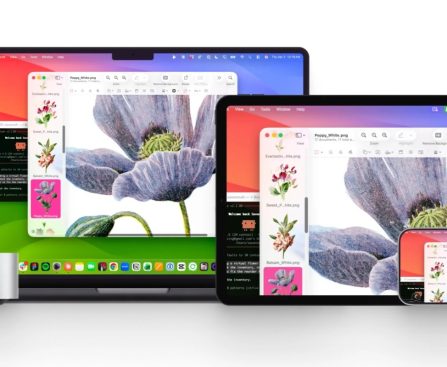
Astropad, renowned for their premium Rock Paper Pencil iPad screen protectors, has launched a new macOS utility named Workbench. This cutting-edge application is crafted to deliver a remote desktop experience suited for the AI age, enabling users to effortlessly connect to their Mac from their iPhone or iPad.

### Features of Workbench

Workbench features native applications for Mac, iPhone, and iPad, providing rapid and high-fidelity streaming with Retina support and virtually lossless visuals. The app facilitates voice input control, permitting users to issue prompts and commands straight from their mobile devices to their Mac. Moreover, keyboard input is accommodated for typing and activating shortcuts, improving the overall user interaction.

A noteworthy capability of Workbench is its function to merge multiple Mac displays into a single screen that aligns with the resolution of the remote device. A mini-map view is also offered, which grants a swift means to navigate expansive desktops, simplifying remote work management for users.

### Tailored for AI Workflows

Astropad has purposely developed Workbench with AI workflows at the forefront. The app empowers users to oversee AI agents operating on their Mac while they are not present, rendering it an essential tool for professionals engaged in artificial intelligence.

### Driven by Astropad’s Liquid Engine

The functionality of Workbench is powered by Astropad’s exclusive Liquid engine, renowned for its speed and clarity. This technology also drives other Astropad products, including Luna Display and Astropad Studio, distinguishing Workbench from alternative remote desktop solutions.

### Pricing and Accessibility

Workbench provides a free trial allowing users to utilize the app for 20 minutes each day. For those needing enhanced connectivity, a subscription is obtainable at $10 per month or $50 per year for unrestricted remote desktop access. The app necessitates iOS 26 and macOS 15 or newer, with compatibility for Intel Macs, although Apple silicon Macs are preferred. Workbench guarantees user confidentiality with end-to-end AES-256 encryption.

For additional details about Workbench, visit Astropad’s official website [here](https://astropad.com/product/workbench/).
Zagreb Launches Europe’s First Commercial Robotaxi Service

Verne, the autonomous mobility company spun out of Croatian hypercar maker Rimac, launched commercial robotaxi rides in Zagreb on 8 April alongside Pony.ai and Uber. The vehicles operate with safety operators onboard for now. Waymo is targeting London for Q4 2026. Verne, the autonomous mobility company spun out of Croatian electric hypercar maker Rimac Group, […]

This story continues at The Next Web

Meta Reenters AI Race with New Model Muse Spark

Meta Superintelligence Labs is launching its first model since Mark Zuckerberg spent billions overhauling the company’s AI efforts. Called Muse Spark, the model now powers the Meta AI app and the Meta AI website in the US, per the company’s announcement. In the coming weeks, Meta says, it will appear in WhatsApp, Instagram, Facebook, Messenger, […]

Samsung Galaxy S26 Ultra’s Privacy Display Function Exposes a Major Vulnerability

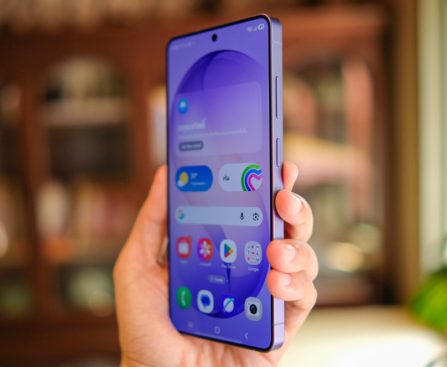
Samsung Galaxy S26 Ultra is an impressive smartphone. While it may not offer significant upgrades over last year’s Samsung flagship, the S25 Ultra — with the primary enhancement being the advanced Snapdragon 8 Elite Gen 5 processor designed for Galaxy devices. Nevertheless, it introduces a feature that’s catching attention in the tech world: the Privacy Display capability of the S26 Ultra.

There have always been methods to shield your phone screen from onlookers, so the idea itself isn’t novel. However, in contrast to third-party screen protectors, this feature is integrated into the device itself, allowing you to toggle it on or off at your convenience. It can even be activated for particular apps or sections of your display, such as selectively hiding notifications.

The Privacy Display of the Samsung Galaxy S26 Ultra represents a significant advancement for the smartphone market, though it has its limitations: activating the Privacy Display slightly reduces its visual clarity at certain viewing angles. A noticeable variance exists in screen appearance before and after enabling Privacy Display regarding brightness and pixel sharpness. However, even when Privacy Display is turned off, the screen remains marginally dimmer in comparison to other Samsung devices, including last year’s Galaxy S25 Ultra.

Understanding the Functionality of the Samsung S26 Ultra’s Privacy Display

When your smartphone screen displays an image, every pixel emits light at a broad angle, enabling visibility from various directions. The Privacy Display of the S26 Ultra functions at a hardware level whereby activating the mode alters the physical behavior of the pixels. The S26 Ultra’s display consists of two types of pixels: standard wide pixels that can be seen from any angle and specialized focus pixels that emit light straight ahead. When Privacy Display is activated, all wide pixels are deactivated, allowing only the other set of pixels to operate.

Unfortunately, this results in some drawbacks even when the feature is not in use. This is due to half of the pixels on the device’s screen having subpar viewing angles. Even with Privacy Display turned off, the S26 Ultra appears dimmer when viewed from certain angles because it effectively