
5 Configurations to Improve Audio Quality on Your AirPods Pro

5 Configurations to Improve Audio Quality on Your AirPods Pro

2 Min Read

best wireless earbuds for audiophiles in tech evaluations and consumer feedback – and for valid reasons. They provide exceptional sound performance and equally remarkable noise cancellation and transparency features. Additionally, when compared to standard AirPods, they offer innovative functionalities, such as heart rate monitoring and extended listening duration.

Since the AirPods Pro function effectively right from the start, users may consider the standard settings satisfactory. However, the earbuds are actually quite adaptable, as they present various enhancements for sound quality and noise cancellation. You can easily locate some of these adjustments in the AirPods Pro menu, while others are buried deeper within the settings in the Settings app. If you aim to maximize your Pro model, whether it’s the original or the latest iterations, we will guide you through some clever adjustments to accomplish that.

Use the correct-sized ear tips

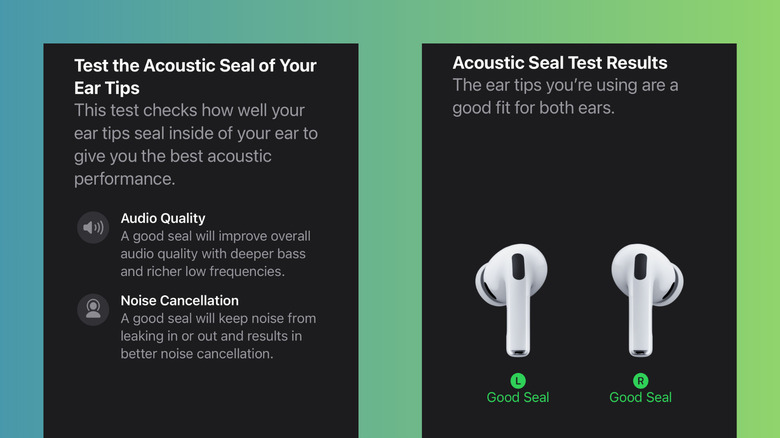
All three AirPods Pro versions come equipped with medium ear tips already attached to the earbuds. This may seem convenient, but to enhance their audio performance further, it’s essential to identify the proper ear tip size for you. The ideal ones ensure a snug fit that seals your ear, guaranteeing you receive deep bass from your music, enhanced noise isolation, and precise heart rate data from the AirPod Pro 3’s integrated sensor. They should also feel comfortable enough for all-day use. If you’re already comfortable with the medium ear tips, you can stick with them. If not, follow these steps:

  1. Take another set of ear tips from the Air Pod Pro package. Ear tips from different generations will not fit.
  2. Swap out the original ear tips.
  3. Wear the AirPods for approximately 15 minutes while moving around.

If the earbuds come loose, attempt a larger size. If they create uncomfortable pressure inside your ear, try a smaller size. If multiple sizes feel appropriate, you can determine the best one by checking their acoustic seal on your iPhone. To do so

You might also like