

djgis/Shutterstock
We may earn a commission on purchases made through these links.
Since the launch of the first model alongside the Xbox 360 (the original Xbox controller was notoriously bulky and awkwardly named “The Duke”), the Microsoft Xbox controller has established itself as a primary option for both console and PC gaming. This remains true in its latest form with the Xbox Series X, even giving competition to the PS5’s DualSense Controller.
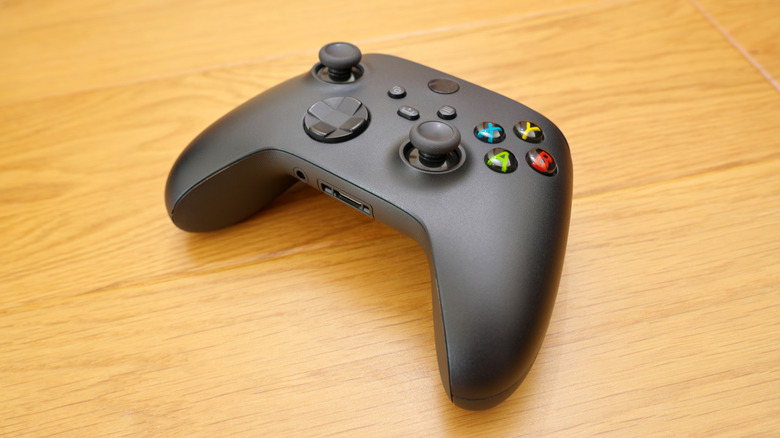
Though most of the buttons and ports on the controller have clear uses, there is one element located at the bottom of the device that is less obvious, a small rectangular port. This enigmatic port is a remnant from the Xbox One era, originally created to compensate for the absence of a dedicated headset port.
The port at the bottom of an Xbox controller is officially referred to as the Microsoft Expansion Port, a proprietary connection intended to link a limited selection of peripherals to your controller. These peripherals mainly consist of chat devices, like headset connectors and keyboards. As contemporary Xbox controllers are equipped with dedicated headset jacks, the Expansion Port has turned a bit redundant, with third-party variations of the controller omitting it entirely. However, if you possess an Xbox controller with an Expansion Port, it can still be utilized if you have a compatible peripheral.
The Expansion Port was originally designed for chat peripherals
The initial Xbox 360 controller, aptly created for the console’s online multiplayer-centric design, included a 3.5mm audio jack at its base, meant to accommodate the official Xbox 360 gaming headset. This feature was quite popular during that console’s lifecycle, leaving players puzzled when the Xbox One debuted in 2013 without that port. Instead of the 3.5mm audio jack, the first Xbox One controller incorporated an Expansion Port.
To connect a headset to the controller, users needed to acquire a separate audio adapter that plugged into the Expansion Port, allowing them to connect their headset and take advantage of the internal volume and mute controls. Alternatively, if your headset had an Expansion Port jack, you could connect it directly to the port.
This proprietary setup did not resonate well with gamers, as audio adapters went predominantly unsold. Consequently, a few years later, Microsoft introduced an improved version of the Xbox One controller featuring a 3.5mm jack next to the Expansion Port for convenient headset connectivity.