
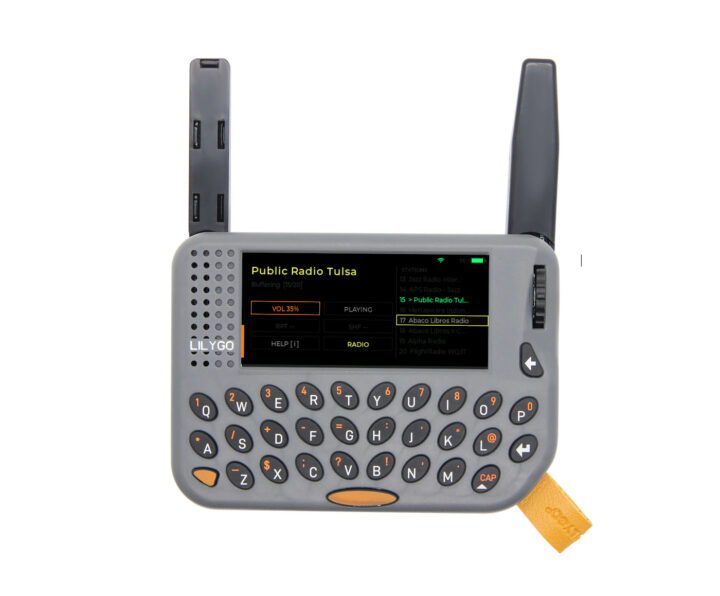

Melody Machine is an open-source firmware transforming the ESP32-S3-based LILYGO T-LoRa Pager into a portable MP3 player and internet radio, moving away from its traditional role as a LoRa-based messenger with Meshtastic or Meshcore.
Key features of the Melody Machine firmware include:
– LVGL-based graphical user interface with four themes
– WiFi Manager — Non-blocking WiFi with network list, password entry via on-screen keyboard, and auto-reconnect
– MP3 playback from SD card with folder browser, shuffle, repeat modes, and seek
– Internet Radio via M3U over WiFi (ICY metadata support)
– Seek — rewind / fast-forward MP3 tracks with the rotary encoder (±5 s per step)
– Dual-core audio/task design
– MP3 decoding runs on Core 0 via FreeRTOS
– UI and WiFi manager on Core 1
– Settings — Saved as JSON on SD card in /melody_machine/settings.json; retains data after reboots and reflashes
– Auto power-off — Configurable idle power-off timer: 15 minutes to 2 hours
The rotary encoder and built-in keyboard provide multiple controls:
– Rotary encoder
– Browse the list
– Enter folder / play track / confirm (built-in button)
– Q / A — Volume +5 / -5
– W / D — Previous/next track
– Space — Play/pause
– B/Backspace — Stop, go up folder, exit seek mode
– R — Cycle repeat: off → one → all
– H — Toggle shuffle
– N — Toggle seek mode (MP3 only, while playing/paused)
– S — Open settings
– S + H — Screenshot to SD
– i — Open controls help
To use, copy music into the mp3 folder and Internet radio M3U playlist files into the m3u folder:
SD:/
└── melody_machine/
├── settings.json ← auto-created on first boot
├── mp3/
│ ├── song1.mp3
│ └── subfolder/
│ └── song2.mp3
└── m3u/
├── rock.m3u
└── jazz.m3u
The settings.json file holds app settings. Add WiFi credentials there instead of entering them while the firmware is running:
{
“wifi”: {
“networks”: [
{ “ssid”: “MyNetwork”, “pass”: “mypassword” }
]
}
}
Find the source code (Arduino) and pre-built firmware on GitHub. Flash the firmware using esptool or run melody_flasher.py for a flasher GUI.
Most software projects today, including Melody Machine, have been developed using AI such as Anthropic Claude. Despite this, the firmware functions as demonstrated in the video demo with Melody Machine v0.1. The latest v0.2 firmware offers an improved UI and better controls. The LoRa radio is not used in this setting.