Blog Posts

Blog Posts

8 Creative Methods to Utilize Thermal Cameras at Home

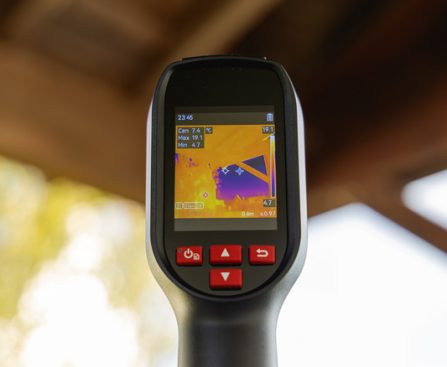
A thermal camera is an instrument that senses heat and subsequently displays that data as a vivid image. This is referred to as a thermogram, where hotter items are represented in brighter shades and cooler items in darker hues. You might have witnessed thermal cameras in use at airports identifying passengers with fevers or in movies showcasing military scenarios, but these devices also have applications in domestic settings.

While some thermal cameras are intended for professional use, there are models created for household applications. In reality, you can convert your smartphone into a thermal camera by utilizing gadgets that connect to its USB port. These attachments include integrated cameras for thermal imagery, alongside companion applications on your device to view, save, and share thermograms.

We explore eight innovative applications for thermal cameras within the home. Although not all may be relevant to everyone, those that are can aid in decreasing energy expenses, enhancing home efficiency, and averting possible incidents.

**Spotting Water Leaks**
Water leaks rank among the most difficult problems you might face at home, as often you remain unaware of the issue until it’s too late. If not detected and addressed, they can lead to soaring water utility bills, mold and mildew growth in the affected spaces, or structural damage that could cost a fortune to remedy. Water leaks frequently happen in the kitchen and bathroom, yet they can be present anywhere in the house.

Thermal cameras can identify water leaks by detecting subtle variations in temperature in walls and ceilings. These discrepancies might indicate the presence of water, potentially due to damaged plumbing, faulty window seals, blocked gutters, or rising groundwater levels. A thermogram showing temperature variations isn’t definitive proof of a water leak, but if you have suspicions, it’s wise to consult a professional to investigate and carry out any necessary repairs before the situation escalates.

**Hunting for Pests**
Pest problems share similarities with water leaks in that they often go unnoticed until signs emerge, at which point it’s likely time to seek professional assistance. Various strategies exist for addressing pest infestations, including eliminating food sources, repairing water leaks, and sealing entry points, but when an infestation has already established itself in your home, a thermal camera may assist in pinpointing hiding spots.

While thermal cameras will not act like X-rays revealing the exact locations of pests within your walls, they can identify unusual heat patterns around your home. For instance, thermal imaging can spotlight areas exhibiting high moisture content, possibly indicating termite tunnels, or regions with elevated temperatures, which could signify nests of wasps or rats. As with water leaks, if a thermal camera detects anything atypical during your pest search, it’s advisable to consult a professional to confirm and manage the issue.

**Locating Electrical Hazards**
Electrical hazards can develop in your home, potentially leading to equipment malfunctions or electrical fires. Certain devices should not be plugged into extension cords to avoid circuit overloads, and some wiring can deteriorate over time. Loose or faulty connections, inadequate insulation, and the accumulation of debris can also pose such risks, but these may not be evident to the naked eye.

One of the most indicative signs of an electrical hazard is increased temperature. Even if everything appears normal at first glance, a thermal camera might uncover that the circuit or wiring is overheating. Using this device is safer than tools requiring direct contact, and you can compare the temperature of the questionable electrical system to those functioning normally. Should your thermal camera detect a potential danger, disconnect the device and reach out to an electrician right away.

**Investigating Heat Loss**
When your home faces insulation or sealing problems, heat loss may occur. This situation arises when warmth escapes through gaps around doors and windows or through the roof as heated air rises. While it is impossible to eliminate this entirely, significant heat loss can lead to various issues. Some rooms may fail to warm sufficiently even if your heating system is working overtime, resulting in higher energy consumption than anticipated.

If signs of heat loss are present, a thermal camera can assist in identifying where it’s occurring. This device can reveal temperature discrepancies caused by roofs and walls with damaged insulation, poorly sealed doors and windows, and inadequately insulated heating pipes. Detecting these anomalies with a thermal camera is swift, as you can scan entire rooms within moments. You may even be able to resolve some heat loss cases independently, such as replacing worn window gaskets or placing draft stoppers under doors.

**Recognizing Intruders**
Outdoor security cameras are becoming increasingly sophisticated, featuring motion detection alerts, two-way audio, and even floodlights. Nonetheless, it’s crucial not to underestimate potential criminals. Even if you have implemented our suggested strategies to bolster your home’s security, they may still find a way to compromise your safety.
How a $30 Cable Weight Turned into My Beloved Desk Essential

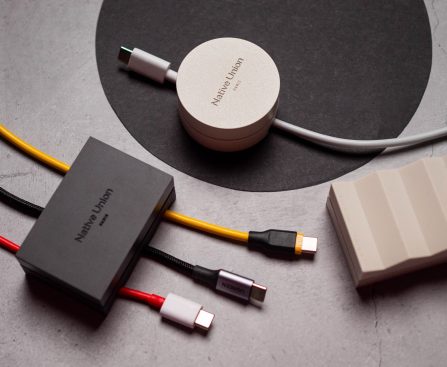
Native Union’s Weighter is a premium answer to a straightforward dilemma, and I appreciate it greatly.

The Weighter is as uncomplicated as they come; it serves as a weighted block that keeps your cables in place without slipping off your desk’s edge. That’s all there is to it. It lacks any extra features or AI — it’s simply a chunk of metal and silicone crafted to tackle a very specific issue.

And I appreciate it greatly. The 3-cable Weighter retails for $29 on Amazon and Native Union’s website, available in both black and sandstone. Additionally, a single-cable variant is priced at $19 for those who don’t require the larger model.

You can find any cable management product on Amazon, often at a much lower price than the Weighter. My primary concern with these alternatives is that they are adhesive-based, and I wasn’t keen on the idea of affixing something to the nightstand. In the past, I used Sugru’s moldable glue and Ikea’s charming cable weights, but we relocated last year, and while the nightstand arrived at the new home intact, the glue did not survive. As for the Ikea weights, I’m at a complete loss as to where to search for them.

In any case, the Weighter is essentially a weighted base that secures your cables while exuding elegance. Weighing in at 172g, it is sufficiently heavy to remain stationary, featuring a top made of metal and a silicone base with cutouts for cable management. It may be an over-engineered approach to a problem, but I admire its appearance, and it fulfills its purpose effectively.

My sole complaint is the prominent Native Union branding and the Paris label below it, but that didn’t stop me from utilizing the Weighter. I placed the single-cable version on my desk while the 3-cable version sits on my nightstand and my dedicated charging station in my office. After three months of use, I haven’t had to contend with cables hanging off the edge of my desk or the side table where my UGREEN Nexode 500W charging station resides. It functions equally well with USB-C cables, barrel plugs, and MagSafe connectors.

Most crucially, I didn’t have to rummage for a cable in the middle of the night when my Galaxy S26 Ultra ran out of power, and for that, I’m grateful the Weighter was created. Yes, numerous other options are available, many costing only a fraction of the Weighter’s price. I’m not suggesting you should purchase it, but if you’re seeking a refined solution for cable management, it’s one of the more aesthetically pleasing options available.

Unboxing Video of iPhone Fold Exposed as Fraudulent

### The Viral iPhone Fold Unboxing Video: A Study of Its Veracity

Recently, an unboxing clip purporting to reveal the eagerly awaited iPhone Fold has gained significant attention online. Initially, the video seems authentic, devoid of the usual signs of being an AI-generated counterfeit. Nonetheless, upon closer examination, several hints indicate that the video may not be what it claims.

#### The Basis for Doubt

Indie developer Victor Saralev, who published the video, conveyed his belief that it is indeed a fabrication. He remarked, “I’m certain this video is fake, but this is the one that went viral throughout the internet.” This skepticism mirrors the opinions of many viewers who have pointed out discrepancies in the video.

#### How Fabricated Unboxing Videos Are Made

There are three main techniques through which fake unboxing videos can be created:

1. **3D-Printed Replica Devices**: Certain Chinese smartphone companies are infamous for imitating the designs of new iPhone models. Additionally, a niche industry exists in China focused on producing realistic replicas of forthcoming Apple devices. These 3D-printed replicas frequently boast high-quality finishes and packaging, making them appear genuine.

2. **Artificial Intelligence**: Although AI-generated content is becoming increasingly advanced, the quality of this particular video appears too high to be solely attributable to AI. It lacks the usual indicators typically associated with AI-generated content.

3. **Digital Creation by Designers**: A skilled designer could have utilized sophisticated 3D rendering software to make the video. This technique allows for a high level of realism and detail, which might account for the believable nature of the footage.

#### Principal Signs of Inauthenticity

The most evident sign that the video is not genuine lies in the inconsistency of the device’s screen layout. From the front, the screen seems seamless, while the rear view shows a noticeable gap between the sides. This discrepancy raises doubts about the device’s physicality, implying that it is likely a digital creation rather than a physical replica. Moreover, the video refrains from displaying the device being flipped over, which would typically occur during an unboxing.

#### Conclusion

Considering the discrepancies in the video and the potential for digital manipulation, it appears plausible that a proficient visual artist, probably with some AI support, is responsible for the creation of the iPhone Fold unboxing video. As the technology for generating realistic digital content progresses, distinguishing the authenticity of such videos becomes more challenging. The viral aspect of this video highlights the necessity of critical assessment in an era where visual media can be easily distorted.

For more insights, you can delve into the original conversation on platforms like CNET.

Ex-Apple Engineers Create AI Gadget Similar to iPod Shuffle, With No Clarification on Its Function

### The Advancement of AI Wearables: An In-Depth Examination of the Button

In recent times, the notion of AI hardware devices has attracted considerable interest, with numerous specialists drawing comparisons between these advancements and the progression of portable music players. Two former Apple engineers, Chris Nolet and Ryan Burgoyne, have launched a novel AI wearable named “Button,” which closely resembles the iPod Shuffle. This article delves into the ramifications of this innovative device, its design, and the wider context of AI wearables.

#### The Idea of AI Wearables

AI wearables have encountered doubt since their beginnings. Earlier endeavors, like the Humane AI pin and the Rabbit R1, received predominantly negative feedback, with critics deeming them as impractical and badly designed. Marques Brownlee, a well-known tech reviewer, referred to the Humane AI pin as the worst product he had ever assessed, summarizing the prevailing opinion surrounding these gadgets.

The central argument against specific AI hardware is that most users already possess powerful smartphones capable of running AI applications. The comparison to the iPod is fitting; while the iPod was groundbreaking in its era, the rise of smartphones made it unnecessary for many users. The same reasoning pertains to AI wearables today—if smartphones were nonexistent, these devices might be intriguing, but their necessity is doubtful in a realm where robust apps are easily accessible.

#### Presenting the Button

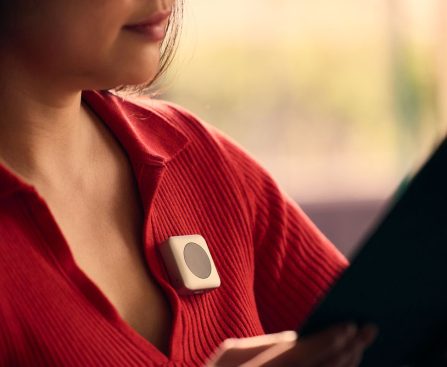
The Button, created by Nolet and Burgoyne, is a small device designed to enable interactions with a generative AI chatbot. The gadget is deliberately crafted to look like the iPod Shuffle, featuring a straightforward button interface. Users can press the button to engage the chatbot, which can listen, respond to queries, and perform commands. The device can deliver audio replies or connect to earbuds and smart glasses via Bluetooth, addressing some privacy issues linked with always-on devices.

In spite of its innovative stance on privacy, the Button prompts an essential question: why is it necessary as an independent device instead of an application on current smartphones? Nolet contends that while AI can be accessed on computers and phones, the Button presents a unique interaction that is “better.” However, he does not clarify what distinguishes the Button from current smartphone applications.

#### The Prospects of AI Wearables

As the Button makes its entry into the market, it signifies a larger trend in the tech sector towards dedicated AI hardware. While the device seeks to tackle privacy challenges and deliver a distinct user experience, it must surmount the doubt surrounding AI wearables. The hurdle lies in persuading consumers that a dedicated device is a worthwhile investment when powerful alternatives are available on their smartphones.

In summary, the Button illustrates the ongoing investigation of AI wearables and their potential impact on our lives. As technology continues to advance, the success of such devices will hinge on their capability to provide unique benefits over current solutions. The discussion surrounding AI hardware is far from concluded, and the Button might just mark the start of a new era in wearable technology.

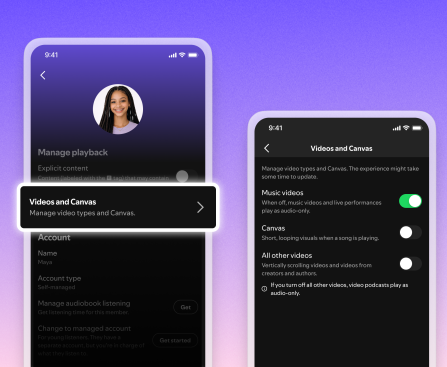
Spotify Now Lets You Disable All Videos

Spotify is adding new toggles to stop any and all video from playing inside the app, for both music and podcasts. The controls are rolling out worldwide, work across all platforms and devices, and can be used by managers of Family Plans to limit video content for every member on the subscription. The new controls […]

Google Simplifies Self-Deepfaking

YouTube Shorts is rolling out a new AI-powered feature giving creators an easy way to realistically clone themselves on camera. The launch, hinted at earlier this year, reflects the platform’s fraught relationship with AI-generated content, adding more generative features while struggling to contain AI slop, deepfake scams, and impersonations. YouTube says the new tool will […]