Adobe Acrobat Unveils Functionality to Transform PDFs into AI-Enhanced Collaborative Work Environments

Adobe is introducing enhanced sharing functionalities for PDF Spaces in Acrobat, enabling users to convert static content into interactive, AI-enhanced summaries, audio presentations, branded slideshows, and personalized chatbots for recipients. This initiative signifies a major advancement in Adobe’s commitment to AI-driven experiences.

### Acrobat Generates Interactive Workspaces from Static PDFs

The newest feature from Adobe, Acrobat PDF Spaces, permits users to upload an array of PDFs, documents, notes, and links. Utilizing Adobe’s AI assistant, users can extract insights, modify documents, and produce various types of content, such as presentations, podcasts, blogs, and social media updates, all within a completely editable interactive workspace.

#### Main Features of the New Productivity Agent:

1. **Build a Customized Space**: Users can combine PDFs, documents, links, and notes into a unified workspace. The AI agent expediently organizes this space, allowing the sender to enrich the experience with context, structure, emphasis, and multimedia components. Any changes to documents are automatically updated in the shared experience, ensuring recipients always have access to the most current information.

2. **Personalize an AI Assistant**: Users can inform the AI Assistant about their objectives and the target audience. This assistant can subsequently answer questions, provide recommendations, and assist recipients in retrieving the information required to make well-informed choices.

3. **Audio Summary**: The AI agent produces an audio overview of the content, guiding recipients before they explore the materials. A fully editable script guarantees that the intended message is communicated accurately.

4. **Branding Features**: Users can insert logos to establish a polished and branded experience.

5. **Engagement Metrics**: The agent offers analytics on engagement, enabling users to follow up with recipients based on their interactions with the shared content.

For instance, a user preparing for a presentation can upload relevant documents and collaborate with the AI to develop a shareable interactive experience. This experience can encompass images, a brand story, and detailed product information, all customized to meet the client’s requirements. After distributing the interactive link, the original creator can monitor engagement metrics, including views and individual recipient interactions.

While primarily designed for professional applications—such as sales, finance, marketing, and HR—the new features can also serve personal projects, like organizing travel plans or event information.

Abhigyan Modi, senior vice president of Adobe Document Cloud, highlighted the innovative nature of this launch, stating, “We’re not just adding new features; we’re introducing a new format. Sharing documents now signifies sharing an experience tailored to your intended audience.”

The new Productivity Agent and PDF Spaces can be accessed in both Acrobat Express and Acrobat Studio.


iPhone 18 Pro to Include Display Enhancement with Two Main Advantages, Based on Report

### iPhone 18 Pro and Pro Max: Expected Features and Enhancements

The iPhone 18 Pro and Pro Max are slated to retain identical display sizes to their predecessors, boasting 6.3-inch and 6.9-inch screens, respectively. However, a recent report suggests that these models will feature a notable technological upgrade in their display systems.

#### Shift to LTPO+ Display Technology

As reported by *The Elec*, Apple is transitioning to LTPO+ technology for the OLED panels employed in the iPhone 18 Pro. This enhancement is anticipated to distinguish it from the earlier generation, which relied on standard LTPO technology.

The manufacturing of the iPhone 18 Pro panels is expected to be largely undertaken by Samsung and LG, as BOE, a former supplier for the iPhone 17 Pro, did not obtain approval for this year’s flagship devices. The report suggests that BOE’s inability to progress is linked to its lower-temperature polycrystalline oxide-plus (LTPO+) technology capabilities, which are reportedly behind those of its rivals concerning panel quality and production yield.

#### Benefits of LTPO+ Technology

The shift to LTPO+ technology offers several advantages:

1. **Enhanced Power Efficiency**: LTPO+ technology boosts battery longevity by promoting more effective power management.
2. **Responsive Adjustments**: This technology allows for improved performance in low-light settings, minimizing flicker and enhancing overall display quality.

LTPO technology is essential for the iPhone’s Always-On Display feature, as it facilitates dynamic refresh rate adjustments. The new LTPO+ variant extends the use of oxide materials to drive thin-film transistors (TFTs), enabling finer control over OLED light emission and optimizing display performance according to environmental factors.

#### Conclusion

The iPhone 18 Pro and Pro Max are set to provide augmented display performance through the introduction of LTPO+ technology, offering users better battery efficiency and a more responsive viewing experience, particularly in challenging lighting situations. As further details emerge, it will be intriguing to see if other models, such as the speculated iPhone Ultra, will also gain from this technological enhancement.

Apple TV Launches Trailer for John Travolta’s First Directorial Project

**Propeller One-Way Night Coach: John Travolta’s Film Debut on Apple TV**

Apple TV is preparing to unveil its upcoming original movie, *Propeller One-Way Night Coach*, premiering on **Friday, May 29**. This film signifies the directorial debut of acclaimed actor John Travolta, who has assumed various roles in the venture as the writer, narrator, and producer. The film draws inspiration from Travolta’s 1997 book of the same title and has sparked excitement with the recent unveiling of its trailer.

The story centers on a young aviation enthusiast named Jeff, portrayed by newcomer Clark Shotwell, alongside his mother, depicted by Kelly Eviston-Quinnett. Their adventure is a one-way journey across the country to Hollywood, promising a transformative experience. The narrative unfolds in what is depicted as the golden age of aviation, highlighting the allure of air travel through delightful interactions with flight attendants, unplanned layovers, and a glimpse of the elegance of first-class service. The film is characterized as a touching adventure filled with enchanting moments, intended to appeal to viewers of all generations.

In the trailer, Travolta makes a short acting appearance, although his main emphasis is on the production and direction of the film. Apple describes *Propeller One-Way Night Coach* as a “film for all ages,” highlighting its family-oriented nature with a significant lack of conflict in the storyline.

The movie will premiere after its showcase at the esteemed 2026 Cannes Film Festival, heightening the excitement surrounding its debut. Eager viewers can view the trailer on Apple’s official platforms.

For those interested in viewing *Propeller One-Way Night Coach*, Apple TV is offered for a subscription fee of **$12.99 per month**, with discounted packages available through the Apple One bundle.

As the release date draws near, fans of John Travolta and aviation aficionados are enthusiastic to embark on this nostalgic flight through the skies.

iOS 26 Brings New Video Playback Functionality to CarPlay: Recent Developments

# Apple’s Significant Shift on CarPlay: Video Playback While Stationary

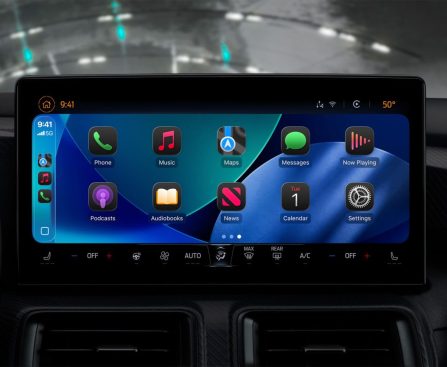
Apple has implemented a major update concerning CarPlay, permitting video playback for the first time after ten years of limitations. With the arrival of iOS 26, users can now officially view videos on their CarPlay displays while their vehicle is parked. This article examines the consequences of this new capability and the existing scenario of video applications in CarPlay.

## Park to Activate Video Playback via CarPlay

This new functionality, termed “video in the car,” was initially brought to attention on Apple’s developer site last summer. The feature allows users to view videos from their iPhones on the CarPlay interface when the automobile is not in motion.

> “AirPlay video in the car enables individuals to enjoy their favorite videos from iPhone directly on their CarPlay display when they are not driving. Integrate support for CarPlay with AirPlay video to activate this feature in your vehicle.”

Apple encourages developers and car manufacturers keen on creating and promoting CarPlay apps with video playback capabilities to investigate the MFi Program for further details.

In early 2025, a third-party application managed to introduce a CarPlay web browser featuring video playback, but this capability was later removed following the App Store review process. Since the release of iOS 26, video playback while parked has been technically allowed for the first time.

## What’s the Current Situation of Video Apps in CarPlay?

At this moment, video playback through CarPlay is not broadly accessible in practice. The execution of this feature is significantly dependent on individual automakers, as they possess the power to enable or disable it in their vehicles.

Currently, there are no public statements from automotive manufacturers indicating intentions to support video playback through CarPlay when parked. The ambiguity surrounding the deployment of this feature persists, as it necessitates explicit backing from automakers in addition to app developers.

The nearest experience to video playback in CarPlay can be found in Apple’s CarPlay Simulator application on Mac. This simulator features a built-in Apple TV app that replicates the experience on a compatible CarPlay system and permits users to play certain videos from their iPhones, including those accessed via Safari, on both iOS 26.4 and iOS 26.5.

One key point noted in the CarPlay Simulator is that video playback may have stringent screen resolution prerequisites, operating solely with a 1920×1080 resolution system.

Despite Apple confirming video playback nearly a year ago, doubts remain regarding the feature’s accessibility for drivers throughout the iOS 26 release cycle. The future of video playback in CarPlay continues to be uncertain, reliant on the choices of automakers and the evolution of compatible applications.

iPadOS 26.5 Brings Three New Features for iPad: What to Anticipate

iPadOS 26.5 is set to release shortly, bringing along three fresh features for your iPad. Here’s what’s coming.

## 1: Automatic pairing for Magic Keyboard, Magic Trackpad, and Magic Mouse

iPadOS 26.5 brings a modification aimed at simplifying the pairing of Apple accessories with your iPad. Now, when you hook up a Magic Keyboard, Magic Trackpad, or Magic Mouse through USB-C, the accessory will automatically create a Bluetooth link as well. This means that when you unplug the USB-C cable, your iPad will retain a wireless connection with the accessory, removing the need for manual Bluetooth pairing. This feature has been present on Macs for years, and it’s fantastic to see it introduced to the iPad.

## 2: New wallpaper with 11+ colorful variants

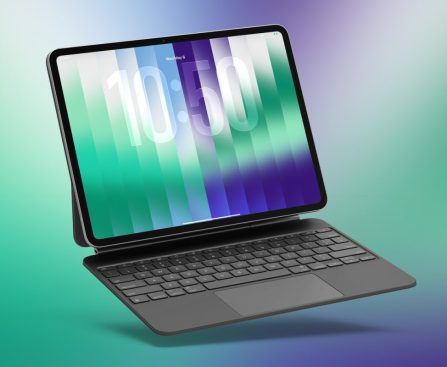
Apple is rolling out a new Pride Luminance wallpaper in iPadOS 26.5, showcasing more than just one wallpaper option. Pride Luminance presents 11 vibrant wallpapers to pick from, and there’s even a custom wallpaper creator feature. Users can choose as few as 1 up to 12 different colors for their wallpaper, offering a fresh and tailored appearance for their iPads.

## 3: Reminders snoozing updates

The Reminders app on the iPad is receiving a modest yet important upgrade in iPadOS 26.5. The snoozing feature available when you long-press a reminder alert has been revamped to include specific snooze times. Instead of broad options like “This Afternoon” or “Tomorrow Morning,” users will now see precise times such as “Remind Me at 3:00 PM” or “Remind Me Tomorrow at 9:00 AM.” This minor adjustment enhances the Reminders’ snooze choices, making them more practical and clear.

## iPadOS 26.5 features: wrap-up

Alongside these features, iPadOS 26.5 also takes advantage of Apple Maps’ new ‘Suggested Places’ feature, which can assist users in discovering new spots while using Maps on their iPads. However, Apple is primarily concentrating on iPadOS 27, which will be revealed next month, showcasing a much larger collection of new features for iPad.

What new features would you like to see come to iPad next? Share your thoughts in the comments.