Comprehending the Distinction Between Upstream and Downstream USB Ports on Your Monitor

Upstream vs. Downstream USB Ports on Your Monitor: What Distinguishes Them?

Upstream and downstream USB ports on your monitor are designed to enhance your PC’s capability. Whether you have a laptop or a desktop, these ports enable the addition of more peripherals when your device’s port availability is somewhat limited. They make for a significantly more user-friendly USB hub for those looking for a simple method to connect devices such as keyboards, mice, or USB headphones.

Although monitor hubs have existed for a considerable time, identifying the monitor that made them widely popular is somewhat challenging. In 2004, Apple updated its now-defunct Apple Cinema Display, which included two FireWire 400 ports in addition to USB 2.0 ports. Nowadays, you will generally find these ports rated at USB 3.0 or higher to ensure a reliable mix of connectivity speeds and power delivery.

What is a USB upstream port on a monitor?

The USB upstream port located on the rear of your monitor serves to establish the connection between the PC and the USB hub. This connection is typically made via USB-B to USB-A cables (often called printer cables) or USB-C, enhancing the device’s capabilities. To determine which port is the upstream USB port, look for its size if it is USB-B, as this port is generally larger than USB-C. If your monitor’s upstream port is USB-C, it is usually marked with a small PC symbol nearby.

Technology companies like Apple and Dell have also incorporated Thunderbolt, an alternative to USB, which offers a consistent 40Gbps transfer speed for file management, a fourfold increase over USB 3.1 Gen 2. Some monitor ports may support cross-compatibility with USB-C or USB4 cables, which may not fully utilize some of Thunderbolt’s advantages but will still provide power to the hub via what is known as the upstream.

What is a downstream USB port on a monitor?

Downstream ports on your monitor’s USB hub are the remaining ports that activate when the upstream is connected. These are typically USB-A or USB-C, designed to provide maximum compatibility with various devices. Downstream ports can accommodate a wide range of devices, with keyboards and mice often suggested to relieve port congestion on desktops or laptops.

Downstream ports equipped with Thunderbolt can also facilitate daisy-chaining monitors from a single source. By connecting a Thunderbolt cable to the downstream port, you can link it to the upstream of the next monitor, allowing both monitors to be utilized. USB-C does support DisplayPort output, which is how it manages monitors, but USB 3.0 and its successors (along with USB4) do not support this feature. Monitors equipped with hubs that have a downstream configuration utilizing USB 3.0 or later will experience significantly enhanced transfer speeds, even when linked through the hub.


Comprehending the Advantages of a Mini PC When You Have a Laptop Already

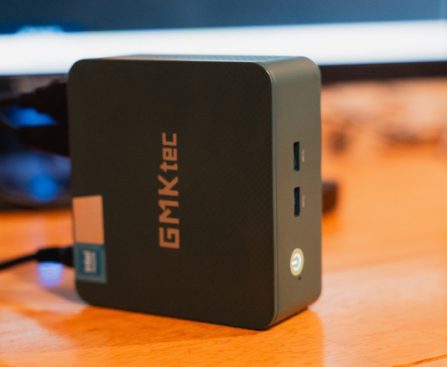
mini PCs may become the standard for fundamental work and leisure activities. For a lot of users, a laptop already fulfills this role, leading them to question the need for a mini PC.

While not essential for everyone, some individuals find mini PCs more appealing than laptops due to aspects like compactness and affordability. Unlike laptops, a mini PC does not come with an integrated display, keyboard, and touchpad. That being said, if you conduct the majority of your computing tasks in a fixed location, such as an office or a room in your residence, this may not be an issue since the mini PC can serve as a dedicated desktop device.

Additionally, if you already own a laptop, you can utilize it while on the move when your mini PC doesn’t meet your needs. Exploring the mini computer option is advisable if you’re looking to enhance your laptop, which you shouldn’t procrastinate on. You can opt for an inexpensive model or Apple’s reliable alternative, the Mac mini, and to note, a mini PC can also take the place of your television’s streaming gadgets.

Mini PCs provide various advantages

Vercel Cloud Development Platform Hacked

Vercel, a major development platform that hosts and deploys web apps, was compromised, and the hackers are attempting to sell stolen data. A person claiming to be a member of ShinyHunters, which was behind the recent hack of Rockstar Games, posted some data online, including employee names, email addresses, and activity time stamps. Vercel confirmed […]

The One-Year Window

A lot of AI startups exist partly because the foundation models haven’t expanded into their category yet. As many jokingly acknowledge, that won’t last forever.

Compact Camera Gadget for Recording Flawless Lightning Strikes

extremely aggressive lightning surrounding a volcano, then a lightning trigger is an excellent item to consider.

Essential tips prior to purchasing a lightning trigger

Initially, you should verify that any lightning trigger you buy is compatible with your camera. If you have more than one camera, ensure it’s suitable for all of them. If you haven’t yet acquired a camera but are interested in the hobby, we provide a compilation of the finest cameras for budding photographers. It’s also wise to set a budget as lightning triggers are often not inexpensive.

Although numerous cameras and accessories may claim to have light-sensitive triggers, you specifically want one engineered for lightning. Lightning occurs so rapidly that without an accessory tailored for lightning photography, it may not function correctly for you. Opting for a lightning trigger that connects wirelessly to your camera is frequently more convenient than using a wired, physical connection. Confirm that it has an extended battery life by checking the product specifications. After all, waiting through a storm for the perfect lightning shot may require it to operate for several hours consecutively. If integrating it with your smartphone

Local AI Demand Might Impact Apple’s Developing Business Model

**Apple Silicon: A Revolutionary Factor for Local AI Models**

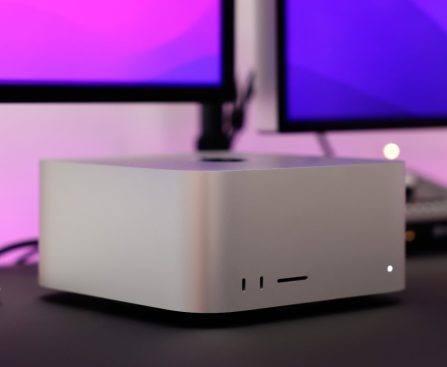
Apple Silicon has surfaced as a formidable entity in the area of local AI model execution, displaying remarkable optimization that attracts an expanding user audience. The need for high-performance Macs, especially the Mac Studio and Mac mini, has increased substantially, resulting in significant shortages. This phenomenon is fueled by numerous factors, including the requirement for robust computing agents, yet many buyers are particularly searching for Macs with considerable unified memory, perfect for executing local large language models (LLMs).

**The Possibility for Apple as a Server Provider**

In the past, Apple has engaged in server solutions, such as the Xserve and a rack-mountable edition of the 2019 Mac Pro. Nevertheless, the lack of a direct successor to these products creates a void in the market. With AI’s ascendance, there is a strong argument for Apple to re-enter the server domain, especially as users want to utilize macOS and Apple services without depending on personal devices. The growing acclaim of headless Mac minis functioning as perpetual servers highlights this necessity.

Should this pattern continue, Apple might realistically investigate a cloud-based server model similar to Amazon Web Services (AWS), enabling customers to remotely access macOS and Apple Silicon for a subscription cost. Apple already has some foundational infrastructure for this initiative, as indicated by its Private Cloud Compute project, which is presently underutilized but ready for growth as Apple enhances its AI competencies.

**The Profitable Opportunity Ahead**

The chance for Apple to engage with the server market is substantial, particularly when considering that a large share of Amazon’s earnings originates from AWS rather than retail transactions. As Apple persists in excelling in the consumer market, venturing into cloud computing services could yield a new revenue source, especially within the AI realm. Leasing compute power on Apple Silicon servers might emerge as a favored solution for users aiming to evade the high expenses of acquiring premium hardware.

With CEO Tim Cook’s expected exit, there could be a chance for new leadership to adopt this approach, particularly with individuals like John Ternus, who has a solid hardware background, potentially leading the charge.

**Conclusion**

Apple’s status as a preeminent technology entity is firmly established, with iPhone sales showing robust performance. However, the rapidly evolving field of AI offers a chance for Apple to broaden its business approach. By providing cloud-based compute services on Apple Silicon, the company could not only satisfy the increasing demand for AI functionality but also develop a sustainable revenue model that stretches beyond one-off hardware sales.