
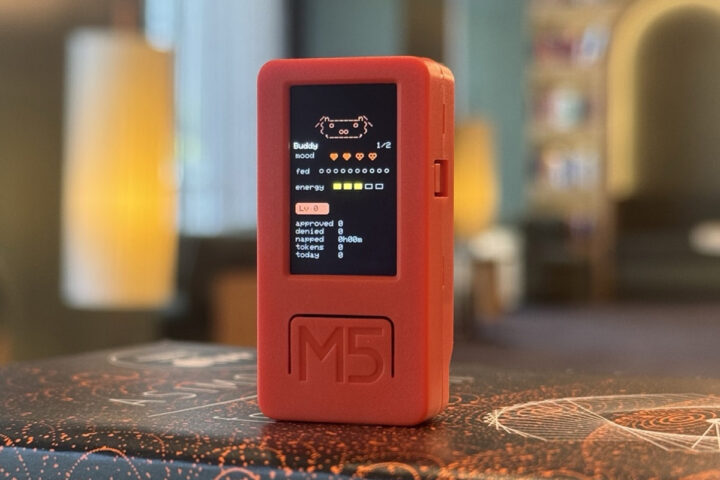

Anthropic has made the Claude Hardware Interface (Bluetooth API) available to developers, allowing an ESP32-S3-based desk companion to connect directly with the Claude desktop app through Bluetooth Low Energy (BLE).
To illustrate this feature, the company introduced an open-source reference project named Claude Desktop Buddy. This project currently operates on the M5StickC Plus (an ESP32-based board from M5Stack) and acts as a compact interactive hardware companion for Claude. During the recent “Build with Claude” event, Anthropic highlighted the ESP32-S3-based M5Stack Cardputer as an ideal hardware choice for developers building physical devices that interact with AI agents.
Designed to serve as a physical companion device for Claude Cowork and Claude Code on macOS and Windows, it remains on your desk, providing real-time updates on the AI agent’s activity. It also enables direct responses to permission requests via its buttons, allowing users to approve or deny actions without reverting to the desktop app, thus enhancing the speed and ease of interacting with the AI.
The “Buddy” feature began as a hidden Easter egg and April Fools’ joke within the Claude Code CLI, intended for release on April 1st, 2026, but was leaked a day early through an npm source map. Developers were able to invoke it with a simple command to display a reactive ASCII character reflecting energy and mood changes in response to coding activity. While initially a novelty to make long terminal coding sessions more enjoyable, its growing popularity led Anthropic to expand the concept beyond software. By late April 2026, the Claude Desktop Buddy project was open-sourced, along with a local Bluetooth Low Energy (BLE) API for Anthropic’s desktop apps. The code and documentation are accessible on GitHub.
This hardware interface resolves a crucial challenge faced by similar AI systems like StackChan, Loona Deskmate, and Espressif’s EchoEar voice chatbot, which do not address frequent user approvals. Instead of repeatedly shifting back to your computer screen, users can now receive prompts and approve or deny actions directly on the ESP32 device via physical buttons over BLE. This local interaction is fast and private, eliminating the need for API keys or internet connectivity. The firmware retains the fun “desk pet” persona with animated visual feedback and the open BLE standard facilitates customization by makers.
The firmware transforms the device into a charming Tamagotchi-style desk pet interacting with Claude. It sleeps when idle, awakens when a Claude session starts, and grows visibly impatient when awaiting an approval prompt.
Built-in states include:
– Sleep – Bridge not connected (eyes closed, slow breathing)
– Idle – Connected, nothing urgent (blinking, looking around)
– Busy – Sessions actively running (sweating, working)
– Attention – Approval pending (alert, LED blinks)
– Celebrate – Level up—triggers every 50K tokens processed (confetti, bouncing)
– Dizzy – Activated by shaking the device’s IMU (spiral eyes, wobbling)
– Heart – Approved a prompt in less than 5 seconds (floating hearts)
For those interested in creating custom animated characters beyond the default ASCII pets, Anthropic offers a sample character called Bufo with custom GIFs. Users can also create their own custom GIF characters using the included prep_character.py tool. To do this, prepare 96-pixel-wide GIFs for each of the seven animation states, create a simple manifest.json file, and package everything in one folder. Drag the folder into the Hardware Buddy window on the computer, and files will be streamed over BLE, instantly presenting the new character on the device. Note: The entire character pack folder (manifest + GIFs) must not exceed 1.8MB to stream and store successfully in the ESP32’s flash memory.
The project supports ESP32 and ESP32-S3 boards using the Arduino framework and can be compiled and flashed with PlatformIO. It currently relies on the M5StickC Plus library for handling the display, buttons, and motion sensor. For other ESP32 or ESP32-S3 boards, users will need to fork the code and adjust the drivers to suit their board’s pin configuration.
On the M5StickC Plus, the front button (A) approves prompts or accesses the menu, the right button (B) scrolls or denies prompts, and the power button toggles the screen or turns off the device. Shaking the device triggers a “dizzy” animation, and laying it face down induces sleep mode. To pair with Claude, enable Developer Mode in the desktop app, open the Hardware Buddy window, and connect over Bluetooth. It will later auto-reconnect. Espressif also supports developers who opt not to use Arduino through its ESP-IDF SDK and ESP Desktop Buddy library.
Recently, we covered the Clawdmeter project, an ESP32-S3-powered Claude Code token monitoring tool. While it shares some similarities with the Claude Desktop Buddy, Claw