

Creating Web Components with Lit involves dealing with numerous challenges.
If you’re not utilizing Constructable Stylesheets, you’re likely struggling with the browser’s memory usage and repetitive style tags. They provide a browser-native method to efficiently share styles across Shadow Roots. Here’s a comprehensive guide on their functionality.
Before delving in, here are two key terms:
- Constructable Stylesheets are
CSSStyleSheetobjects created directly in JavaScript. adoptedStyleSheetsis the browser API that attaches these objects to a shadow root or the document itself.
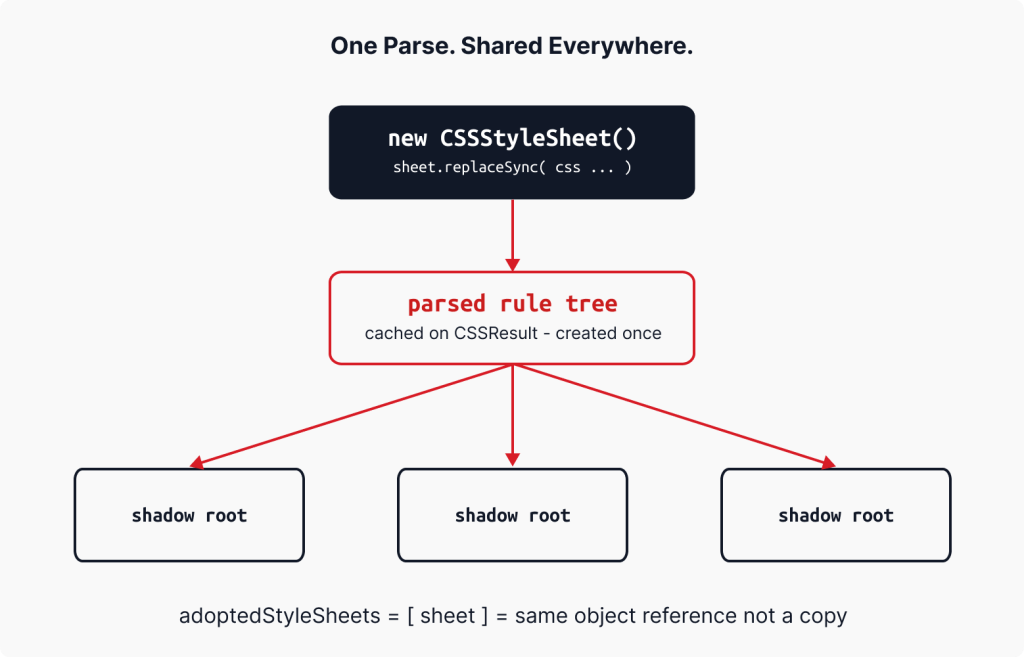
The core advantage is simple: the browser parses a stylesheet once and shares it across every instance of your component. For example, mounting 200 elements in AgnosticUI parses the CSS exactly once, differing from the previous method of injecting a tag into each shadow root, leading to full CSS parsing per instance.
This article explains the raw API’s workings, how Lit utilizes it, and practical applications. We’ll refer to AgnosticUI v2 throughout. While we’ll touch upon remaining challenges like SSR serialization and CSS Module Script support, those are just side notes.
What the Raw API Looks Like
It’s beneficial to see the raw browser API before examining Lit’s implementation.
const sheet = new CSSStyleSheet();
sheet.replaceSync(`button { background: hotpink; cursor: pointer; }`);
await sheet.replace(`@import url('/tokens.css'); button { ... }`);
this.shadowRoot.adoptedStyleSheets = [sheet];
document.adoptedStyleSheets = [sheet];
Key points: First, there’s no parsing on adoption: the stylesheet is parsed once during replaceSync or replace, with adoption acting as a reference assignment. Second, the reference is shared: assigning the same CSSStyleSheet to multiple shadow roots results in shared rule trees, enabling instant propagation of changes via sheet.replaceSync(...). Third, document scope works too: document.adoptedStyleSheets can inject global styles for dynamic theming and branding across micro-frontends.
Inspecting Constructable Stylesheets in DevTools
Supported since Chrome 85, here’s how to find them:
- Open DevTools and click on Elements.
- Click on a custom element, expand its shadow root in the DOM tree.
- In the Styles pane, rules from adopted stylesheets appear as
constructed stylesheetwith editable rule blocks. - Select
orfor document-leveladoptedStyleSheetsin the Styles pane. - Constructed stylesheets in the Sources panel appear without file paths, allowing you to set breakpoints on style changes.
What Lit Does with static styles
The raw API is low-level; fortunately, Lit automates all this for you. Writing this in a Lit component:
import { LitElement, css } from <span